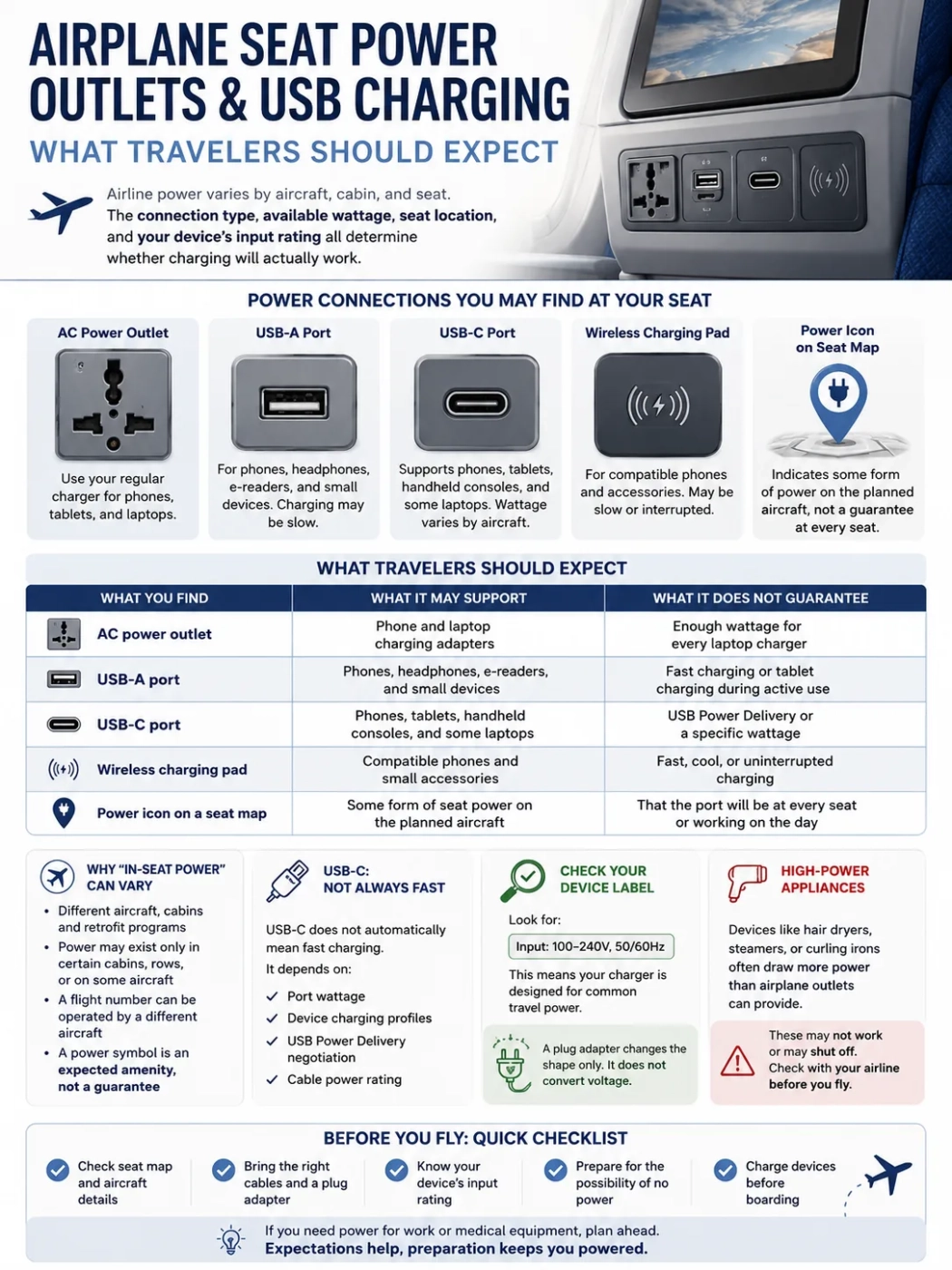
Airplane seat power can range from a low-output USB-A port to a USB-C connection capable of charging some laptops. An airline may advertise “in-seat power” even when the outlet is available only in certain cabins, rows, or aircraft configurations. The connection type, available wattage, seat location, and your device’s input rating all determine whether charging will actually work.
| What you find | What it may support | What it does not guarantee |
|---|---|---|
| AC power outlet | Phone and laptop charging adapters | Enough wattage for every laptop charger |
| USB-A port | Phones, headphones, e-readers, and small devices | Fast charging or tablet charging during active use |
| USB-C port | Phones, tablets, handheld consoles, and some laptops | USB Power Delivery or a specific wattage |
| Wireless charging pad | Compatible phones and small accessories | Fast, cool, or uninterrupted charging |
| Power icon on a seat map | Some form of seat power on the planned aircraft | That the port will be at every seat or working on the day |
Why “In-Seat Power” Can Mean Different Things
There is no single passenger power setup used across all airlines. The same airline may operate aircraft with full AC and USB charging, aircraft with USB only, and regional aircraft with no passenger power. Even two aircraft with the same model name can have different cabins because they were delivered at different times or refurbished under different programs.
A listing that says “power available” may refer to:
- An AC outlet at every seat
- An AC outlet shared between two or three seats
- Power available only in business class or premium economy
- Power installed in selected rows
- A USB-A port built into the entertainment screen
- A USB-C port with an undisclosed wattage
- Charging available only on selected aircraft assigned to the route
The operating carrier matters as well. A ticket sold under a major airline’s flight number may be operated by a regional partner using a smaller aircraft with a different cabin. The aircraft shown during booking can also be replaced before departure.
A power symbol should be treated as an expected amenity, not a charging guarantee. Travelers who need electricity for work or medical equipment should prepare for the possibility that the planned outlet is unavailable.
The Charging Connections Found on Airplanes
Universal or Multi-Standard AC Outlets
An AC outlet lets you use the charging adapter that normally plugs into a wall. Many aircraft outlets are designed to accept more than one plug shape, but the accepted plug types vary. A socket may accept Type A and Type C plugs while rejecting a larger Type G plug, even when it looks universal.
Passenger AC systems commonly provide a converted 110V-class output intended for portable electronics. The exact voltage, waveform, frequency, and wattage limit depend on the installed system. The outlet may shut down when a connected device asks for more power than the seat system permits.
Check the label on the charger before connecting it. A charger marked Input: 100–240V, 50/60Hz is designed to accept the common voltage and frequency ranges used by modern travel power supplies. This is common on phone, tablet, camera, and laptop chargers.
A mechanical travel adapter may be needed when the charger’s plug does not fit the aircraft socket. A plug adapter does not convert voltage. It changes the physical connection only.
USB-A Ports
USB-A remains common on older and mid-life aircraft interiors. It is the familiar rectangular USB connection used with many older phone and accessory cables.
Some aircraft USB-A ports provide enough power for a phone, wireless headphones, an e-reader, or a camera battery charger. Older ports may deliver power slowly. A phone used for movies, games, Bluetooth, and Wi-Fi may consume power almost as quickly as the port supplies it.
Possible results include:
- The battery percentage rises slowly
- The battery remains near the same percentage
- The battery continues falling, but more slowly
- The device reports “slow charger” or a similar warning
- A tablet charges only while its screen is off
A USB port built into the seatback entertainment screen should not automatically be treated as a high-output charging port. Its main purpose may be limited charging, media access, or system servicing.
USB-C Ports
USB-C is appearing more often in new aircraft and cabin refurbishment programs. Its small reversible connector can support more power than older USB-A systems, but the shape of the port does not reveal how much power is available.
An aircraft USB-C port might provide basic phone charging, 15W charging, 30W charging, or USB Power Delivery at 45W, 60W, or another installed limit. A higher-output connection may charge tablets, handheld gaming systems, and USB-C laptops without a separate AC adapter.
USB-C does not automatically mean fast charging. The result depends on four parts working together:
- The wattage supported by the aircraft port
- The charging profiles supported by the device
- The USB Power Delivery negotiation between the port and device
- The power rating of the cable
A laptop that normally uses a 65W charger may charge well from a 60W USB-C port during light work. The same laptop may lose battery while rendering video, running demanding software, or powering external accessories.
Wireless Charging Pads
Wireless charging pads are mainly found in newer premium seats and selected refurbished cabins. They remove the need for a cable, but they are sensitive to phone position.
Charging may stop when turbulence moves the device away from the charging coil. Thick cases, metal accessories, camera bumps, and heat can also reduce performance. A wireless pad is useful for topping up a compatible phone, but it should not be the only charging method packed for a long flight.
Older DC and EmPower Connections
Some older long-haul cabins may still contain a 15V DC connection commonly associated with older EmPower systems. These ports require a compatible adapter and are not the same as a normal AC wall outlet.
They were designed when portable computer power requirements were generally lower. A legacy connection may not support a modern workstation, gaming laptop, or high-output USB-C charging setup. Travelers who do not recognize a socket should not force a plug into it.
How Seat Power Reaches Your Device
Wattage Matters More Than the Port Symbol
Watts describe how quickly electrical energy can be supplied. A device can connect successfully but still receive less power than it wants.
Small accessories need little power. Phones and tablets need more, especially during active use. Laptop demand varies widely by model and workload. High-performance laptops may use power supplies rated at 100W, 140W, 180W, or more.
| Device | Older USB-A | Basic USB-C | 45–67W USB-C | Seat AC outlet |
|---|---|---|---|---|
| Wireless headphones | Usually suitable | Usually suitable | Usually suitable | Suitable with charger |
| E-reader | Usually suitable | Usually suitable | Usually suitable | Suitable with charger |
| Smartphone | May charge slowly | Usually charges | May support faster charging | Usually suitable with charger |
| Tablet | May charge slowly or hold level | Depends on output | Usually suitable | Usually suitable with charger |
| Handheld gaming device | Often insufficient during use | Depends on output | May charge during use | Usually suitable within outlet limit |
| Thin USB-C laptop | Not practical | May charge only while sleeping | Often usable during light work | Usually usable within outlet limit |
| Standard business laptop | Not practical | Usually insufficient | May charge or slow battery loss | Depends on charger wattage |
| Gaming laptop or mobile workstation | Not suitable | Not suitable | Usually below full demand | May trip the seat power limit |
These outcomes are estimates rather than guarantees. A device can use less power when idle and much more under load. Battery condition, screen brightness, background applications, charging settings, and connected accessories can all change the result.
Why Two USB-C Ports May Share One Power Limit
A seat unit with two USB-C connections does not necessarily provide the advertised maximum to both ports at the same time. The stated wattage may be a shared total.
For example, a dual-port system with 60W of combined output could distribute power in several ways:
- Most of the available power goes to one laptop
- The output is divided between a phone and tablet
- Each port drops to a lower charging level when two devices are connected
- One device receives priority according to the system’s charging logic
Unplugging the second device may allow a laptop to negotiate a higher charging level. The behavior depends on the installed seat unit and its power-management software.
How to Read the Device and Charger Label
The most useful electrical information is normally printed on the charging adapter rather than on the phone or laptop.
Look for a line similar to:
Input: 100–240V ~ 50/60Hz 1.5A
This means the adapter is designed to accept:
- Input voltage between 100 and 240 volts
- Either 50Hz or 60Hz mains frequency
- Up to the stated input current under its rated operating conditions
This wide-range input is common on modern phone chargers, laptop chargers, tablet adapters, camera battery chargers, electric toothbrush chargers, and many CPAP power supplies.
The output line is different. It describes what the adapter sends to the connected device. A USB-C charger may list several output combinations, such as 5V, 9V, 15V, or 20V. The charger and device select a compatible profile when USB Power Delivery is supported.
Does 50Hz or 60Hz Matter on an Airplane?
Country electricity guides use 50Hz and 60Hz because local wall outlets are connected to the destination’s electrical grid. An airplane seat outlet uses an onboard conversion system, so the destination country’s frequency does not determine the seat outlet output.
Modern electronic chargers labeled 50/60Hz are usually able to accept either common mains frequency. Motor-driven, timing-sensitive, heating, and specialist equipment should not be connected to airplane seat power unless the airline and device manufacturer permit it.
When a Plug Adapter May Still Be Needed
A universal-looking seat outlet may not securely accept every international plug. A traveler carrying a Type G, Type I, Type J, or another regional plug may need a compact plug adapter to fit the aircraft socket.
The adapter should:
- Hold the charger firmly without hanging loosely
- Preserve grounding when the device requires grounding
- Fit without blocking a neighboring outlet
- Avoid unnecessary switches, extension leads, or extra sockets
A plug adapter does not convert voltage. The charger itself must accept the outlet’s electrical input.
Phone Charging: Usually Possible, Not Always Fast
Phones are among the easiest devices to charge from airplane seat power. They can use USB-A, USB-C, wireless charging, or an AC charger depending on what the seat provides.
A slow result does not always mean the port is defective. Charging speed may be reduced because:
- The USB-A port has a low output limit
- The USB-C port does not support the phone’s preferred fast-charging profile
- The cable is damaged or rated for low power
- The phone is streaming, gaming, or using in-flight Wi-Fi
- The battery is warm and the phone has reduced charging speed
- Another device is sharing the seat unit’s power budget
Airplane mode can reduce radio activity, but passengers may turn Wi-Fi and Bluetooth back on where permitted. Reducing screen brightness and downloading entertainment before departure can help the battery recover more quickly from a low-output port.
Laptop Charging: The Charger Rating Is Only Part of the Story
A laptop adapter marked Input: 100–240V, 50/60Hz is normally voltage-compatible with common aircraft AC systems. The more common problem is the seat outlet’s power limit.
A 65W laptop charger may work without difficulty. A 100W or 140W USB-C charger may work at a reduced level if the laptop supports lower charging profiles. A large 180W or 240W AC adapter is more likely to exceed the available seat power.
The wattage printed on an adapter is its maximum rated output, not proof that it draws that amount continuously. A laptop may draw much less while reading documents and much more during video editing, gaming, software compilation, or battery fast charging.
Why the Outlet Shuts Off When the Laptop Is Connected
Seat power systems monitor each outlet or seat group. The system may disconnect power when it detects an overload, electrical fault, or unsupported startup demand.
Common causes include:
- The laptop charger exceeds the outlet’s limit
- The battery is nearly empty and requests a high charging rate
- The laptop is performing demanding work
- The charger produces a short startup surge
- Several seats share the same power module
- A second device is connected to the same seat unit
- The charger or cable has a fault
- The outlet is worn and the plug is losing contact
Repeatedly reconnecting an adapter that immediately trips the outlet is unlikely to solve the problem. It can also make it harder to distinguish a power-limit issue from a damaged socket.
Reducing Laptop Power Demand
A laptop may remain usable from a limited outlet when its demand is reduced:
- Enable battery-saver or low-power mode
- Lower screen brightness
- Close games, editing software, and other demanding applications
- Disconnect external drives and unnecessary USB accessories
- Pause fast charging if the device provides that setting
- Allow the computer to charge while shut down or sleeping
- Charge one device at a time
When the seat provides USB-C and AC power, the better choice depends on the laptop. A suitable 60W USB-C connection may be more stable than a large AC charging brick that approaches the outlet limit.
High-Power Appliances Do Not Belong on Seat Outlets
Passenger outlets are intended for portable electronics. They are not suitable for high-power or heat-producing appliances.
Do not attempt to operate:
- Hair dryers
- Curling irons
- Hair straighteners
- Travel kettles
- Clothes irons
- Hot plates
- Portable heaters
- High-power cooking appliances
These devices can require far more wattage than the seat system supplies. Some also create heat, burn, fire, or cabin-safety concerns unrelated to plug compatibility.
Even a dual-voltage hair dryer or curling iron should not be used from an airplane seat outlet. Dual voltage only addresses electrical compatibility; it does not make an appliance suitable for cabin use.
Where the Outlet May Be Hidden
Seat power is not always placed where it is easy to see. Common locations include:
- Under the front edge of the seat
- Between two seats near the floor
- Below the seatback entertainment screen
- Inside or beneath the armrest
- On the side of a premium-seat console
- Inside a storage compartment in business class
An outlet between seats may be shared. One passenger’s large charger can block access for another passenger, and a cable may cross the leg area when the outlet is positioned near the floor.
A compact charger is easier to support than a heavy charging brick. If the outlet is loose, a short extension should not be assumed acceptable; airline rules on extension leads, power strips, and splitters vary. Ask the cabin crew before using anything beyond a normal charger and cable.
When In-Seat Power Becomes Available
A port that does not work during boarding may become active later. Airlines and aircraft systems can control passenger power according to the stage of flight.
Power may be:
- Off while the aircraft is at the gate
- Enabled after the doors close
- Available only above a stated altitude
- Temporarily interrupted during engine start
- Switched off for takeoff or landing
- Disabled while the electrical system is reset
- Unavailable after a fault is detected
There is no universal activation point. Cabin crew can confirm whether power should be available on the current aircraft, although they may not be able to repair an individual port during the flight.
Why a Port Can Be Installed but Not Working
Seat power equipment receives heavy use. Cables are inserted at awkward angles, large adapters pull on sockets, and ports may be exposed to dust, spilled liquids, or damaged connectors.
A non-working connection may be caused by:
- A cabin-wide power setting
- A disabled group of seats
- An overload from another seat on the same circuit
- A worn AC outlet
- A damaged USB port
- A cable or charger fault
- A temporary system reset
- A maintenance issue recorded before departure
A Safe Troubleshooting Order
- Check whether the port has a status light
- Remove and reconnect the plug without forcing it
- Try a second cable if one is available
- Test a lower-power device such as a phone
- Disconnect other devices from the same seat unit
- Wait until the aircraft reaches cruise if power is not yet active
- Ask whether the cabin power system can be checked or reset
Stop using the connection if it is cracked, unusually hot, discolored, loose, sparking, or producing an electrical smell. Do not insert an object into a USB port or attempt to clean a powered socket.
Checking Power Before Choosing a Seat
The most useful information usually comes from the airline’s aircraft page, booking details, and seat map. Generic statements about an airline’s fleet may not describe the aircraft assigned to one flight.
Before Booking
- Check whether the flight is operated by the airline or a regional partner
- Look for the planned aircraft model
- Review cabin-specific power information
- Check whether the wording says “every seat,” “selected rows,” or “selected aircraft”
- Confirm whether AC, USB-A, and USB-C are listed separately
After Booking
- Review the latest aircraft assignment in the reservation
- Open the seat map and inspect the amenity description
- Check whether the aircraft model has several cabin layouts
- Recheck the flight details shortly before departure
- Prepare for a last-minute aircraft substitution
The aircraft tail number is usually not assigned far enough in advance to provide a permanent guarantee. Operational changes, maintenance, weather, and scheduling can all result in another aircraft being used.
Aircraft and Flight Types: Likely Charging Conditions
| Aircraft or cabin type | What may be available | Main uncertainty |
|---|---|---|
| Small regional aircraft | No power, selected-row AC, or limited USB | Power may not be installed at all |
| Older narrow-body aircraft | Shared AC outlets or older USB-A | Different cabin versions within the same fleet |
| Refurbished narrow-body aircraft | AC, USB-A, USB-C, or a combination | The refurbishment may not cover every aircraft yet |
| Long-haul wide-body aircraft | AC and USB at many or all seats | Older USB-A may remain in some cabins |
| Premium economy | Seat-level AC and USB are more common | Port output can still be limited |
| Business or first class | Several ports, easier access, and possible wireless charging | Technical failures and aircraft swaps remain possible |
The Move Toward Laptop-Capable USB-C
Newer in-seat USB systems can supply up to 60W at an individual seat, which is enough for many phones, tablets, and thin laptops. A dual USB-C outlet introduced in April 2026 provides up to 60W shared across its two connections, showing why travelers must distinguish between per-port power and combined power.
Some new and refurbished cabins are moving beyond basic phone charging and into power levels that can support many USB-C laptops. Emirates has announced a 111-aircraft retrofit phase covering 60 Airbus A380s and 51 Boeing 777s with Panasonic Astrova, including 67W USB-C charging at every seat on the aircraft receiving that system. This does not mean every Emirates aircraft already has 67W USB-C, or that 67W has become a standard across airlines.
Emirates originally announced in November 2025 that the next retrofit phase would begin from August 2026. A later Emirates update published on July 14, 2026 states that the next phase involving the new seatback displays and other cabin changes will begin in October 2026. The upgrades will be installed gradually, so availability will depend on the individual aircraft operating the flight.
The change will not reach every route at once. Aircraft remain in service for many years, and cabin upgrades are installed gradually. Travelers should expect 60W-class USB-C, higher-output USB-C on selected newer cabins, low-output USB-A, AC outlets, and aircraft without seat charging to coexist across airline fleets.
Power Bank Rules Changed in 2026
Power banks are lithium batteries carried as spare power sources. They are not treated the same way as a phone or laptop with a battery installed inside it. The 2026 rules should be separated by the aviation rules that apply to the trip rather than treated as one worldwide quantity limit.
International ICAO Rules
ICAO specifications effective March 27, 2026 limit passengers to no more than two power banks per person and prohibit passengers from recharging a power bank from an aircraft power supply during flight. Capacity, short-circuit protection, carry-on storage, and operator requirements also remain relevant.
U.S. FAA Rules
FAA PackSafe guidance uses a different quantity rule. For rechargeable lithium-ion batteries and power banks rated at 100Wh or less, there is no fixed quantity limit when the batteries are for the passenger’s personal use. Larger spare lithium-ion batteries rated from 101Wh to 160Wh require airline approval and are limited to two per person. Power banks and other spare lithium batteries must remain in carry-on baggage.
Your Airline May Be Stricter
An airline may set lower quantity limits, lower Wh limits, storage requirements, or a full ban on using a power bank during the flight. A carrier can therefore impose a two-power-bank limit, a one-power-bank limit, or another restriction even where the FAA baseline for personal-use batteries at or below 100Wh does not set a fixed number.
| Issue | What travelers should expect |
|---|---|
| Checked baggage | Power banks and other spare lithium batteries must not be placed in checked baggage |
| Cabin quantity | ICAO: maximum two power banks per passenger. U.S. FAA: no fixed quantity limit for personal-use rechargeable batteries at or below 100Wh; 101–160Wh spare batteries are limited to two with airline approval |
| Capacity | Check the visible Wh rating and the limits applied by the relevant aviation rules and operating airline |
| Charging the power bank | ICAO prohibits recharging a power bank from aircraft power during flight; on U.S. itineraries, also check the operating airline’s onboard-use rules |
| Using it to charge another device | Restrictions depend on the operating airline and may prohibit use throughout the flight |
| Storage | Keep it protected from short circuits and follow the airline’s cabin-storage instructions |
Some airlines prohibit both charging a power bank and using it to charge another device during the flight. Others impose lower capacity or quantity limits or require the battery to remain in a specific accessible location.
Do not assume that a power bank can always replace a non-working seat outlet. Check the operating airline’s current battery rules before departure, especially when an itinerary includes different carriers or countries.
How to Find the Watt-Hour Rating
A power bank may display its capacity in watt-hours, milliamp-hours, or both. When voltage and amp-hour capacity are known, watt-hours can be calculated as:
Wh = V × Ah
A rating of 20,000mAh equals 20Ah, but the correct calculation must use the battery’s stated nominal voltage rather than the USB output voltage. The safest option is a power bank with a clear manufacturer-applied Wh rating that remains readable during inspection.
Medical Devices Must Have an Independent Power Plan
A CPAP machine, portable oxygen concentrator, ventilator, or other medical device should not depend on an ordinary passenger outlet. An aircraft change, damaged port, system shutdown, or seat-power restriction could remove the expected supply.
Airline requirements vary, but travelers may need to:
- Contact the accessibility or medical-assistance team before departure
- Confirm that the device is approved for onboard use
- Carry an independent battery supply
- Provide enough battery life for a stated percentage of the flight duration
- Protect spare battery terminals
- Keep the device within the permitted storage area
- Avoid emergency-exit seating
Some airlines require or recommend battery capacity covering at least 150% of the expected flight time. A ten-hour flight may therefore require enough approved battery capacity for fifteen hours. This is airline- and device-specific rather than a universal rule for every medical device.
Seat power should never be the only planned energy source for a device required for health or breathing support.
A Practical Charging Kit for a Flight
A small set of compatible cables is more useful than relying on one connection type.
- A compact charger marked Input: 100–240V, 50/60Hz
- A USB-C to USB-C cable rated for at least 60W when charging a laptop
- A USB-A to USB-C or USB-A to device cable for older aircraft
- A cable long enough to reach an outlet below the seat
- A small plug adapter when the charger plug may not fit a multi-standard outlet
- Fully charged devices before boarding
- Downloaded documents, maps, music, and entertainment
- Battery-saver settings configured before the flight
USB-C cable power ratings matter. Certified USB-C to USB-C cables may be marked for 60W or 240W. A 60W cable is suitable for a 60W seat port, while a higher-power cable does not make the port deliver more than its installed limit.
A multi-port charger can be useful, but its total output may be divided when several devices are connected. It should not be used to bypass a seat outlet’s power limit.
Before Connecting a Device at Your Seat
- Identify whether the connection is AC, USB-A, USB-C, or wireless
- Check the device charger for Input: 100–240V
- Confirm that the cable supports the required wattage
- Use one device first before adding another
- Wait until passenger power is active
- Reduce laptop demand if the outlet disconnects
- Do not connect heat-producing appliances
- Check the operating airline before using seat power with a power bank; ICAO’s 2026 specifications prohibit recharging power banks during flight
- Stop using a damaged, hot, or unstable connection
- Keep an independent power plan for medical devices