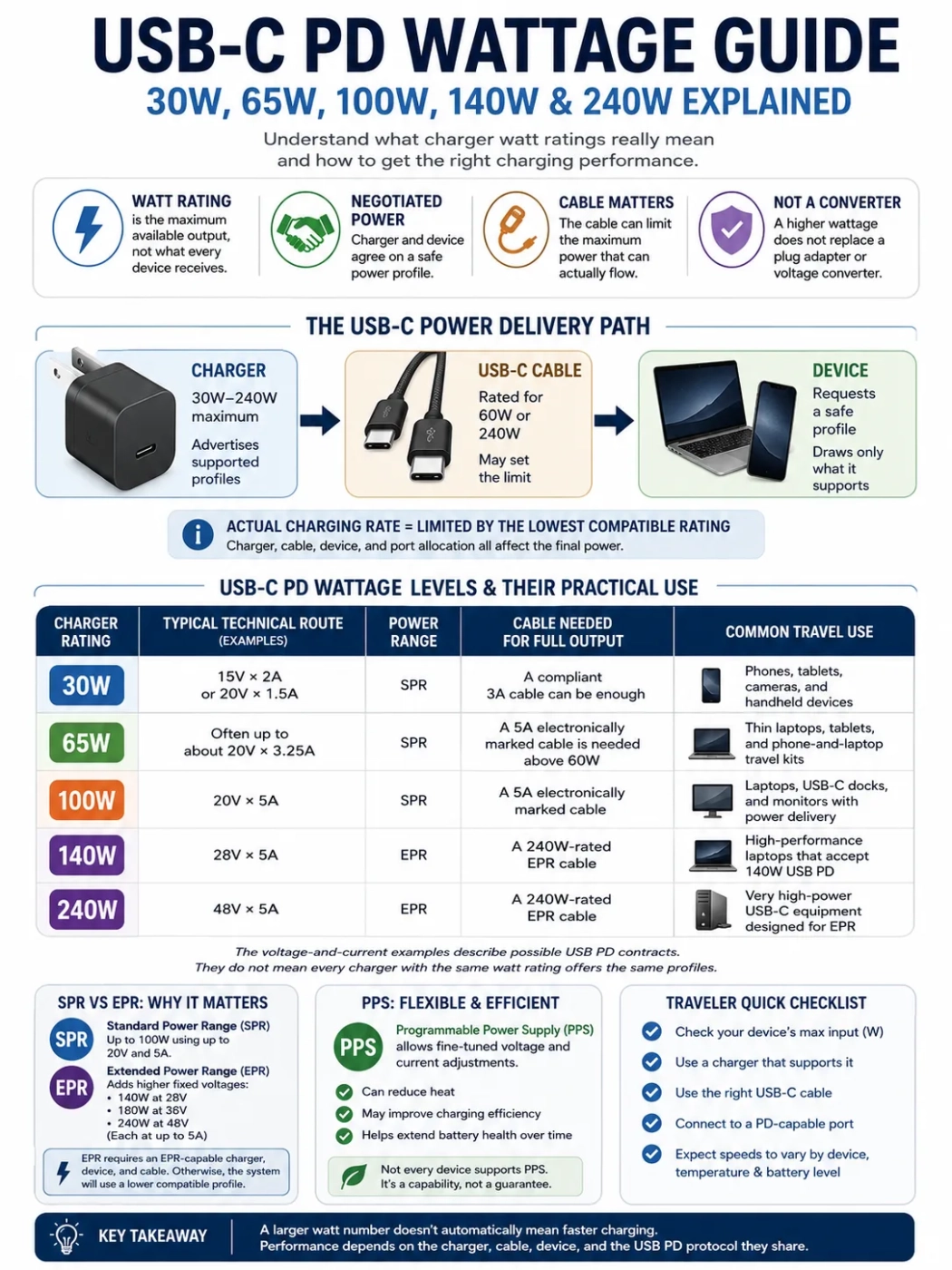
A USB-C charger’s watt rating is its maximum available output, not the amount it forces into every device. A 30W phone connected to a 140W or 240W charger will normally request only a compatible charging profile. Full-speed charging depends on the charger, the device, the USB-C cable, and the charging protocol they share.
For most travelers, 30W suits phones and smaller electronics, 65W covers many thin laptops, 100W provides more capacity for laptops and docks, and 140W or 240W is intended for equipment that supports USB Power Delivery Extended Power Range. A larger number is not automatically faster, and it does not replace a plug adapter or voltage converter.
| Charger rating | Typical technical route | Power range | Cable needed for full output | Common travel use |
|---|---|---|---|---|
| 30W | Examples include 15V × 2A or 20V × 1.5A | SPR | A compliant 3A cable can be enough | Phones, tablets, cameras, and handheld devices |
| 65W | Often up to about 20V × 3.25A | SPR | A 5A electronically marked cable is needed above 60W | Thin laptops, tablets, and phone-and-laptop travel kits |
| 100W | 20V × 5A | SPR | A 5A electronically marked cable | Laptops, USB-C docks, and monitors with power delivery |
| 140W | 28V × 5A | EPR | A 240W-rated EPR cable | High-performance laptops that accept 140W USB PD |
| 240W | 48V × 5A | EPR | A 240W-rated EPR cable | Very high-power USB-C equipment designed for EPR |
The voltage-and-current examples describe possible USB PD contracts. They do not mean every charger with the same watt rating offers the same profiles.
Wattage Is a Negotiated Limit, Not a Fixed Push
USB Power Delivery allows a charger and device to exchange information before moving to a higher output. The charger advertises the profiles it can supply. The device requests one it can accept. The cable may place another limit on the connection.
The usable charging rate can be summarized as:
Available charging output is limited by the lowest compatible rating among the charger, cable, device, and active port allocation.
A 100W charger, a 60W cable, and a laptop that accepts 65W will not create a 100W charging session. The cable may hold the connection to 60W, while the laptop may draw even less as its battery fills or its temperature rises.
SPR and EPR Explain the Jump Above 100W
USB Power Delivery has two ranges that matter when comparing modern chargers:
- Standard Power Range (SPR) covers USB-C PD charging up to 100W, using up to 20V and 5A.
- Extended Power Range (EPR) adds higher fixed voltages. The main levels are 140W at 28V, 180W at 36V, and 240W at 48V, each at up to 5A.
The move from 100W to 140W is not a small extension of the same 20V arrangement. It requires an EPR-capable charger, an EPR-capable device, and an EPR-rated cable. When one part does not support EPR, the system will normally use a lower compatible USB PD contract.
Where PPS Fits
Programmable Power Supply, usually shortened to PPS, lets compatible chargers adjust voltage and current in smaller steps than fixed USB PD profiles. It is often useful for phone charging because the phone can request an output suited to its battery and internal charging system.
A charger can have a high watt rating without supporting the PPS range a particular phone expects. The phone may still charge through a fixed USB PD profile, but it may not reach its preferred fast-charge mode. Both the charger and the device must support PPS for PPS charging to be used.
EPR can also provide adjustable operation at higher voltages, but this should not be treated as another name for phone-oriented PPS. Check the listed USB PD features instead of relying on wattage alone.
30W USB-C PD: Compact Charging for Smaller Devices
A 30W USB-C charger is commonly enough for phones, tablets, camera battery chargers, power banks, handheld consoles, electric toothbrush chargers, and other smaller electronics. It can also charge some low-consumption laptops, especially when the computer is asleep or switched off.
The limit becomes more noticeable when a laptop is operating while charging. The screen, processor, wireless connection, and attached accessories may use much of the available 30W. The amount left for the battery can be small, so the battery percentage may rise slowly or remain unchanged.
When 30W Is Usually Enough
- Only a phone and small USB devices are carried.
- Devices are charged one at a time.
- The laptop is designed for a low-watt USB-C supply.
- Small charger size matters more than charging several devices together.
- The charger includes the PPS profile required by the phone.
When 30W May Be Too Low
- A laptop expects 45W, 60W, or 65W during normal use.
- A USB-C dock must power the laptop and connected accessories.
- A tablet and phone need to charge at the same time.
- The charger’s 30W total is divided between two ports.
Using a 30W charger with a laptop that asks for more does not normally overload the laptop. The common results are slow charging, no charging, or continued battery drain during demanding work. The device manufacturer’s charging requirements remain the safest reference.
65W USB-C PD: A Practical Travel Middle Ground
For travelers carrying a phone, tablet, and thin laptop, 65W is often a useful single-charger rating. It can provide enough output for many office laptops while remaining smaller than many 100W or EPR chargers.
The label needs careful reading. A two-port charger marked 65W may provide 65W only when one device is connected to its main USB-C port. Connecting a phone to the second port may change the split to 45W plus 20W, 45W plus 18W, or another manufacturer-defined combination.
Why a 65W Charger Can Stop at 60W
A standard 3A USB-C cable reaches 60W at 20V:
20V × 3A = 60W
A 65W profile at about 20V needs more than 3A. The connection therefore requires a cable approved for 5A operation and identified electronically. When the charger, laptop, and cable do not all support the required current, the connection may remain at 60W or move to another supported profile.
This five-watt difference looks small on a product label, but it crosses an important cable boundary. Travelers replacing a lost cable should not assume that every USB-C cable can restore the original 65W charging rate.
Where 65W Works Well
- A thin laptop is the highest-demand device.
- The phone can charge later or from a second lower-power port.
- The charger’s single-port output table lists the laptop’s required profile.
- A suitable 5A cable is packed for the laptop connection.
100W USB-C PD: The Top of Standard Power Range
100W uses the SPR maximum of 20V at 5A. It suits laptops that need more than 65W, USB-C monitors that charge a connected computer, and docks that reserve some incoming energy for their own electronics and attached devices.
A laptop designed for 65W can normally use a compliant 100W USB PD charger. It will request a profile it supports instead of drawing the full 100W. The extra charger capacity can still be useful when the same unit has multiple ports or when a dock sits between the charger and laptop.
Dock Input Is Not the Same as Laptop Output
A dock labeled for 100W input may not pass the full 100W to the computer. Part of the input may be used by the dock, storage devices, network hardware, card readers, or other connected accessories. The dock specification should state its maximum USB-C output to the host laptop.
A 100W charger can also fall below the recommended rating for a performance laptop. The computer may operate normally during light tasks but reduce performance or use battery energy during gaming, rendering, or other demanding work.
What Cable Is Needed at 100W?
Full 100W charging requires 5A cable support. Retail listings may still call these products “100W cables,” but the current USB-IF cable marking system uses 60W and 240W classes for certified USB-C-to-USB-C cables.
A correctly specified 240W EPR cable can also carry lower 65W and 100W sessions. Using a higher-rated cable does not raise the charger or device above its own limit.
140W USB-C PD: The First Common EPR Step
140W charging uses 28V at up to 5A. The higher voltage is the defining change. A legacy SPR-only 100W cable cannot be assumed to support a 140W EPR session even though both ratings use up to 5A.
Full 140W operation requires three matching parts:
- The charger must list a 140W USB-C output and EPR support.
- The laptop or other device must accept 28V EPR charging.
- The USB-C cable must be rated for 240W EPR operation.
There is no separate official 140W cable class in the current USB-IF power-label system. Travelers should look for a properly specified 240W cable rather than assuming a cable sold only as “100W” is suitable.
A 140W Charger Does Not Make Every Laptop Faster
A laptop limited to 100W USB PD will normally remain at 100W or below when connected to a 140W charger. Another laptop may require a manufacturer-specific charging method for its highest performance mode and accept a lower rate from standard USB-C PD.
The device’s USB-C input specification matters more than the watt number printed on its original AC adapter. A computer supplied with a high-watt proprietary adapter may have a lower USB-C charging limit.
180W USB PD: The EPR Level Between 140W and 240W
USB PD EPR also defines a 36V level that can reach 180W at 5A. It sits between 140W and 240W. The level helps explain the EPR voltage sequence even when retail chargers are more commonly advertised around 140W or 240W.
A charger described as “180W total” does not necessarily provide 180W from one USB-C port. It may distribute that total across several ports. Look for the single-port output table and a listed 36V EPR profile when evaluating a true 180W USB-C output.
240W USB-C PD: Maximum EPR Capacity
240W is reached through 48V at up to 5A. It is intended for equipment that needs far more energy than phones and thin laptops. A 240W charger can still charge lower-power USB-C devices, but those devices will remain within their own supported profiles.
Full 240W charging requires:
- An EPR charger capable of a 48V profile
- A device designed to accept that EPR profile
- A 240W-rated EPR USB-C cable
- A port allocation that leaves the full output available
A 240W number printed on the front of a multi-port charger may describe the combined output of all ports. One port might be limited to 140W, 100W, or another value. The detailed output table is more useful than the largest number on the package.
A 240W Cable Does Not Create 240W Charging
A cable only allows a compatible charger and device to negotiate within the cable’s limits. Replacing a 60W cable with a 240W cable will not make a 30W phone charge at 240W, and it will not turn a 100W charger into a 140W source.
Power Rating and Data Speed Are Separate
A cable rated for 240W can still be intended mainly for charging and basic USB 2.0 data. Another 240W cable may support 20Gbps, 40Gbps, or 80Gbps data, depending on its design and certification. Wattage alone does not confirm video output, high-speed storage performance, or dock compatibility.
| Cable detail | What it controls | What it does not prove |
|---|---|---|
| 60W or 240W power rating | Maximum supported charging class | Data speed or video capability |
| USB data rate | Maximum supported data transfer rate | That a device will charge at the cable’s full watt rating |
| Video or Alt Mode support | Use with compatible displays and docks | High charging output |
| Cable length | Physical reach and, in some designs, available performance | Protocol compatibility by itself |
For a travel dock, one cable may need to handle charging, data, and video at the same time. Check all three capabilities instead of choosing by wattage alone.
Multi-Port Chargers: Total Output vs One-Port Output
Multi-port chargers can be harder to compare than single-port models because their watt rating may describe a shared output budget. The charger may redistribute output whenever another cable is connected, even if the second device draws only a small amount.
| Connected devices | Possible allocation | Travel effect |
|---|---|---|
| One laptop on USB-C1 | Up to 140W | The laptop can access the highest port profile if it supports EPR |
| Laptop plus phone | 100W + 30W | The laptop may drop from 140W to 100W |
| Laptop, tablet, and phone | 65W + 45W + 20W | All devices charge, but none receives the front-label total |
These allocations are examples, not a universal output table. Read the port combinations for the exact charger. Terms such as “single-port output,” “total output,” “shared output,” and “simultaneous output” describe different limits.
Why Charging Can Restart When a Second Device Is Connected
Some chargers briefly interrupt output when a device is connected or removed so they can renegotiate the port allocation. A laptop or phone may show charging stop and restart for a moment.
This can be normal for that charger design. Repeated disconnections without any change to the connected ports may instead indicate a damaged cable, loose connector, unsuitable wall outlet, or unstable power source.
Why Real Charging Speed Is Lower Than the Label
A watt rating describes a maximum operating point, not a constant battery charging rate. Real charging changes throughout the session.
- Battery level: Charging usually slows as the battery approaches full.
- Temperature: A warm phone, laptop, charger, or cable may reduce output.
- Device workload: The screen, processor, graphics hardware, and attached accessories consume part of the incoming energy.
- Port sharing: A second device can reduce the first port’s allocation.
- Protocol mismatch: A phone may not receive its preferred rate without the expected PPS range or manufacturer charging method.
- Cable condition: Long, damaged, or poorly made cables can cause instability or lower negotiated output.
Charging software may display an estimated rate that changes from moment to moment. Treat that reading as a snapshot rather than proof that a charger is delivering its package rating continuously.
Using USB-C PD Chargers Abroad
USB-C wattage describes the low-voltage output delivered to the device. International wall power is a separate issue. Before connecting a charger abroad, check the AC input line printed on the charger.
What “Input: 100–240V, 50/60Hz” Means
A label such as Input: 100–240V, 50/60Hz normally means the charger can accept the common voltage and frequency systems used in many countries. In most cases, the charger does not need a voltage converter when the local supply falls within that range.
The plug may still not fit the destination power outlet or socket type. A physical travel adapter may be required. A plug adapter does not convert voltage. It changes the physical connection only.
If the charger has a grounded input plug, choose a travel adapter that preserves grounding where a grounded outlet is available. A small ungrounded adapter should not be treated as equivalent to a grounded connection.
When the Charger Has a Narrower Input Range
A charger marked only for one voltage, such as 120V, should not be connected directly to a 230V supply unless its documentation clearly permits it. A voltage converter may be needed, although replacing the charger with a compatible universal-input power supply is often simpler for low-voltage electronics.
Never assume that a USB-C connector on the device proves the AC charger can accept every country’s wall voltage. The charger input label and the device’s USB-C charging specification answer different questions.
Hotel USB Ports and Universal-Looking Sockets
Built-in hotel USB ports can be slow, worn, or limited to basic charging. They may not provide USB Power Delivery at all. A universal-looking wall socket may accept several plug shapes, but it does not change the local voltage.
Do not assume that a hotel’s universal-looking socket changes the voltage. Use the charger’s input label to confirm electrical compatibility and use the hotel socket only when it holds the plug securely.
Phones, Laptops, and Other Travel Devices
| Device | Common charging range | What to check | Travel concern |
|---|---|---|---|
| Phone | USB PD fast charging is often within 20W–45W, but models vary | USB PD and PPS support | A higher-rated charger may not make the phone charge faster |
| Tablet | Often 20W–45W, depending on the model | Maximum USB-C input and simultaneous use | Charging may slow during gaming, drawing, or external-display use |
| Thin laptop | Often 45W–100W | Recommended input, cable current, and port allocation | Low-watt chargers may work only when the laptop is idle or asleep |
| Performance laptop | 100W–240W where supported | SPR, EPR, or manufacturer-specific charging | Standard USB-C may not unlock the laptop’s highest performance mode |
| USB-C dock | Depends on laptop demand and dock overhead | Dock input rating and host pass-through output | The dock may reserve part of the charger output |
| Camera battery charger | Usually low to moderate | USB-C input profile and cable type | A USB-C-shaped port may not support every PD profile |
| Electric shaver | Device-specific | Input voltage and whether charging uses USB-C or a proprietary supply | Single-voltage models require more care abroad |
| CPAP or medical equipment | Device-specific | Original power supply, voltage range, connector, and manufacturer instructions | Do not rely on a general USB-C estimate for medical use |
Charging Phones and Tablets
A 65W, 100W, 140W, or 240W USB PD charger can normally charge a lower-power phone without forcing the charger’s full output into it. The phone requests a supported profile. Charging speed may still be limited by PPS support, temperature, battery level, and the phone’s own maximum input.
A multi-port charger may reduce the phone’s rate when a laptop is connected, or reduce the laptop’s rate when the phone is added. The charger’s simultaneous-output table shows which device receives priority.
Laptop Chargers and USB-C Input Limits
Match the charger to the laptop’s stated USB-C input rather than only to the wattage printed on a proprietary charger. A laptop supplied with a 180W barrel-connector adapter may accept only 100W through USB-C, while another model may accept 140W EPR.
When using a lower-rated charger, separate three possible outcomes:
- The laptop powers on.
- The laptop maintains its battery level during light use.
- The laptop charges while operating under a demanding workload.
A charger can meet the first outcome without meeting the other two.
Hair Dryers, Curling Irons, Kettles, and Clothes Irons
These appliances normally use AC wall power directly and are not made compatible by carrying a higher-watt USB-C charger. Check the appliance device label for voltage, frequency, and wattage.
A dual-voltage hair tool may show a range such as 110–240V, sometimes with a manual selector. A single-voltage 120V hair dryer should not be connected to a 230V supply through a simple plug adapter. Always check the device label before using high-power appliances abroad.
Small travel voltage converters also have output limits and may not suit electronically controlled, motor-driven, or heat-producing devices. Follow the appliance and converter instructions rather than choosing only by plug shape.
Choosing Between 30W, 65W, 100W, 140W, and 240W
Choose 30W When
- The travel kit is centered on a phone, tablet, camera, and small USB devices.
- Only one main device needs fast charging at a time.
- No laptop requires more than 30W during use.
Choose 65W When
- A thin laptop is part of the travel kit.
- One charger should cover a laptop and phone at different times.
- The charger’s port-sharing table still leaves enough output for the laptop.
- A suitable 5A cable is available for output above 60W.
Choose 100W When
- The laptop recommends more than 65W.
- A dock or monitor sits between the charger and computer.
- Several devices will share one charger.
- EPR is not required by the laptop.
Choose 140W When
- The laptop explicitly supports 28V EPR charging.
- A 240W-rated EPR cable will be used.
- The main USB-C port retains 140W when other ports are occupied, or the laptop will be charged alone.
Choose 240W When
- The device explicitly accepts a 240W EPR profile.
- The charger provides 48V at up to 5A from one USB-C port.
- The cable is rated for 240W EPR.
- The larger charger is justified by the equipment rather than by the phone’s charging needs.
Six Checks Before Relying on One Charger
| Check | Where to look | Why it matters |
|---|---|---|
| Device maximum USB-C input | Device specifications or original power-supply information | Sets the highest useful charger output |
| USB PD features | Charger and device specifications | Confirms fixed PD, PPS, and EPR compatibility |
| Single-port output | Charger output table | Shows what one connected device can receive |
| Shared-port allocation | Simultaneous-output table | Shows what changes when several devices are connected |
| Cable rating | Cable marking and specification | Prevents a 60W cable from limiting a 65W or higher session |
| AC input range | Charger label | Confirms whether the charger accepts the destination voltage and frequency |
Also check the destination plug type. A charger labeled Input: 100–240V, 50/60Hz may be electrically compatible across many countries but still need a travel plug adapter to fit the wall socket.
USB-C PD and Cable Markings in 2026
As of September 2026, USB-IF continues to list USB Power Delivery Specification Revision 3.2 Version 1.2 as the current base specification, with the latest package in its Document Library dated September 14, 2026. The version number has not changed. The current USB Type-C Cable and Connector Specification remains Release 2.5, dated April 8, 2026.
The consumer-facing cable distinction remains useful: certified USB-C-to-USB-C cables are marked for either 60W or 240W capability. Data-rate markings are separate, and a basic USB 2.0 cable can carry a power marking without advertising a higher data rate.
EU common-charger requirements also apply to covered laptop categories from April 28, 2026. This supports more consistent USB-C charging for affected products sold in the EU, but it does not mean every laptop accepts 140W or 240W. The laptop’s listed input profiles and maximum charging rate still control the session.
Common Wattage Mistakes
- Buying by the largest number on the charger: The number may be total shared output rather than one-port output.
- Using any USB-C cable for 65W: A 3A cable can limit a 20V connection to 60W.
- Assuming a 240W cable is the fastest data cable: Power rating, data speed, and video support are separate.
- Treating GaN as a charging protocol: GaN describes component technology. It does not guarantee PPS, EPR, or a particular port allocation.
- Matching the original charger’s wattage without checking USB-C input: A laptop may accept a different maximum through USB-C.
- Ignoring wall-power compatibility: USB-C output does not confirm that the charger accepts the destination voltage.
- Expecting full speed near 100% battery: Devices normally reduce charging as the battery fills.
- Depending on a universal-looking hotel socket: Socket shape does not prove voltage conversion or reliable grounding.
Frequently Asked Questions
Can I use a 240W USB-C charger with a 30W phone?
Usually, yes, when both products use compatible USB-C PD standards and are in good condition. The phone requests a supported profile and does not automatically receive 240W.
Why does my 65W charger deliver only 60W?
The cable may be limited to 3A, which equals 60W at 20V. Port sharing, device limits, heat, or the available PD profiles can also reduce output.
Do I need a 240W cable for 140W charging?
Yes. A 140W session is part of EPR and requires an EPR-rated cable. Current certified USB-C cable power markings use the 240W class for this purpose.
Is a 100W charger always faster than a 65W charger?
No. A device that accepts only 65W will not gain charging speed from the larger charger. A 100W unit can still be useful for port sharing or for a dock that consumes part of the input.
Will a 240W cable improve data speed?
Not by itself. Check the cable’s separate data-rate and video-support information. Some 240W cables are intended mainly for charging and basic data.
Do I need a voltage converter for a USB-C laptop charger abroad?
Usually not when the charger label states Input: 100–240V, 50/60Hz. A plug adapter may still be needed for the destination socket. Chargers with a narrower input range require separate evaluation.