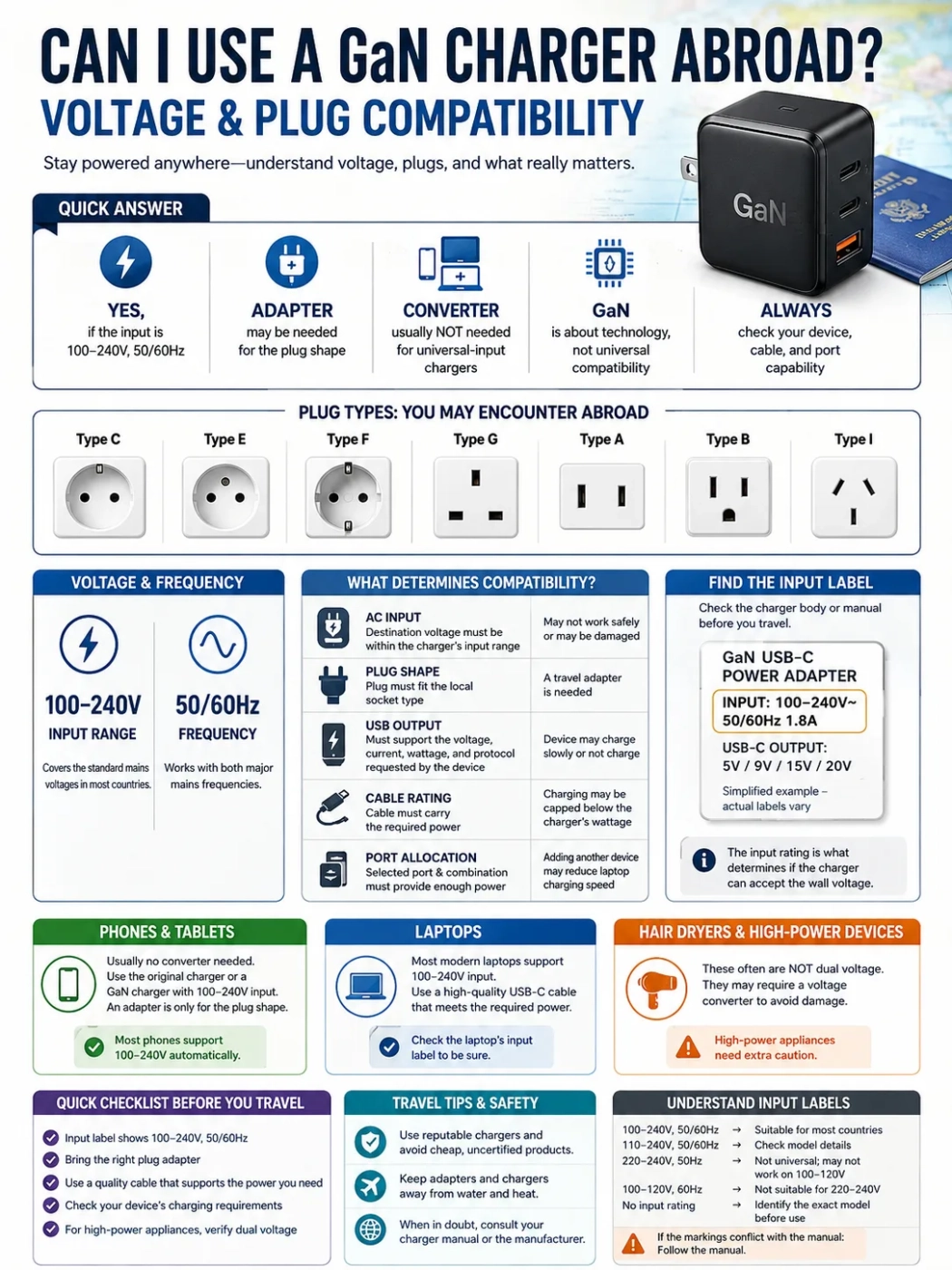
Yes, you can usually use a GaN charger abroad when the charger itself is marked Input: 100–240V, 50/60Hz. That range covers the standard mains supplies used in most countries. You may need a plug adapter for the local socket, while a voltage converter is normally unnecessary for a universal-input charger.
GaN refers to the charger’s semiconductor technology. Travel compatibility still depends on the AC input range, plug shape, USB output, cable rating, and the power required by the connected device.
| Check | What must match | If it does not match |
|---|---|---|
| AC input | The destination voltage must fall within the charger’s stated input range | Use a different compatible charger or an appropriate electrical solution |
| Plug shape | The charger must connect to the local socket | Use a suitable travel plug adapter |
| USB output | The charger must offer a power profile the device can use | Charging may be slower or unavailable |
| Cable rating | The cable must carry the required power | Charging can be limited below the charger’s maximum |
| Port allocation | The selected port and port combination must provide enough power | Adding another device may reduce charging speed |
GaN and Travel Compatibility
GaN stands for gallium nitride. Charger manufacturers use it in power-conversion circuits to build compact power supplies capable of relatively high output. A 65W, 100W, or 140W GaN charger can therefore replace several larger charging bricks when the devices share compatible USB charging standards.
The travel decision comes from the electrical specifications printed on the charger rather than the GaN label. Two GaN chargers with the same advertised wattage can have different AC input ranges, USB Power Delivery profiles, port limits, plug designs, and regional versions.
The most useful line is the one beginning with Input. For international travel, a marking such as 100–240V~ 50/60Hz is the common wide-range specification to look for.
Read the AC Input Label
The rating is usually printed on the charger body near the pins, below a removable plug head, or beside the model number. Model-specific documentation can help when the text is unusually small or worn.
- 100–240V covers the common 100V, 110V, 120V, 220V, 230V, and 240V mains systems.
- 50/60Hz shows support for both common mains frequencies.
- The tilde symbol indicates alternating-current input.
- An input current such as 1.5A or 1.8A is different from the USB output current supplied to a device.
| Input marking | Travel meaning |
|---|---|
| 100–240V, 50/60Hz | Suitable for the standard mains supplies used in most countries |
| 110–240V, 50/60Hz | Check the model specification before using it on a 100V supply |
| 220–240V, 50Hz | Designed for higher-voltage mains rather than 100–120V operation |
| 100–120V, 60Hz | Designed for lower-voltage mains and unsuitable for direct 220–240V use |
| No readable input rating | Identify the exact model and its electrical specification before use |
If a marketplace listing and the charger body show different values, use the specification for the exact model in hand. Chargers with similar cases can be sold in different regional versions.
Wall Outlet, Charger, Cable, and Device
International charging works as a chain. The wall provides the local voltage and frequency, the plug adapter handles the physical connection, the charger converts accepted AC power into USB output, the cable carries that output, and the device requests a supported charging profile.
A typical travel check is simple: confirm the destination voltage and socket type, read the charger input, select a plug adapter when needed, then check the USB port, cable, and device power requirements.
A plug adapter does not convert voltage. It changes the physical plug-to-socket connection. For a charger marked 100–240V, that is usually the only mains-side accessory required.
USB-C, USB Power Delivery, and Charger Wattage
USB-C describes the connector. USB Power Delivery describes a charging system that can negotiate different power levels between compatible equipment. A GaN charger may support USB-PD, PPS, manufacturer-specific fast charging, or several of these systems.
A charger advertised as 100W supplies up to its supported limit under the conditions listed for the relevant port. A phone may request far less, while a laptop may request 45W, 65W, 100W, 140W, or another supported level. The connected device takes the profile negotiated with the charger rather than the charger's maximum output by default.
USB Power Delivery can reach 240W with compatible Extended Power Range equipment. Higher-power USB-PD profiles use 28V, 36V, and 48V fixed-voltage levels for applications beyond the earlier 100W ceiling. Charger, cable, and device support all have to line up for those higher levels.
PPS and Device-Specific Fast Charging
Some phones use USB-PD Programmable Power Supply profiles for their faster charging modes. Other devices use additional charging systems supplied by the manufacturer. When the preferred fast-charging mode is unavailable, a device may still charge at a lower supported USB level.
- Basic charging: the device receives a supported power level.
- Fast charging: charger and device share a compatible higher-speed protocol.
- Maximum rated charging: charger, port, cable, device, temperature, and battery condition all meet the required conditions.
Cables Can Set the Power Limit
USB-C cables that look alike can differ in power rating, electronic identification, data performance, construction, and length. For charging, the power capability matters most.
USB-IF certified USB-C to USB-C cable categories use 60W and 240W power markings. A cable suitable for a phone or 60W laptop setup may become the limiting part when paired with a 100W or 140W charger and a higher-power laptop.
Higher-current operation uses electronically identified cables designed for that role. A 140W charger connected through a lower-rated cable can still work, but the available charging power will be limited to a level supported by the cable and the rest of the connection.
Replace cables with loose connectors, damaged insulation, bent contacts, unusual connector heat, or repeated charging interruptions.
Multi-Port GaN Chargers
Multi-port chargers often change their output allocation as devices are connected. The wattage on the front of the charger may represent the highest single-port output, the combined output of all ports, or both under different port combinations.
| Devices connected | Possible allocation | Travel effect |
|---|---|---|
| One laptop | Up to the highest single-port rating | The laptop has the best chance of receiving its expected input |
| Laptop and phone | Power may split, such as 65W plus 30W | The laptop may report a lower-power charger |
| Laptop, tablet, and phone | Total output is divided across three ports | One or more devices may charge more slowly |
Some chargers briefly renegotiate USB-PD when a second device is attached, which can cause a short disconnect and reconnect. The charger's port-allocation diagram or manual gives the actual combinations for that model.
Travel Adapter or Voltage Converter?
| Equipment | What it changes | When it is relevant |
|---|---|---|
| Plug adapter | Physical plug-to-socket connection | The charger accepts the local voltage but its pins do not fit |
| Voltage converter | Supply voltage | The powered equipment cannot accept the local mains voltage |
| USB-C GaN charger | Accepted AC input into supported USB output profiles | Charging compatible USB devices within the charger's power and protocol limits |
For a GaN charger marked 100–240V, 50/60Hz, an appropriate plug adapter is normally enough when the charger's own pins do not fit the destination socket. Using a universal-input charger is usually simpler than adding a mains voltage converter to a USB charging setup.
Common Travel Routes
| Travel situation | Typical requirement | Useful check |
|---|---|---|
| United States to continental Europe | Plug adapter | Match the local Type C, E, or F socket arrangement |
| Continental Europe to the United States or Canada | Type A/B-compatible adapter | Make sure the charger sits firmly in the adapter and wall outlet |
| United States or Europe to the United Kingdom | Type G adapter | Check the adapter's electrical rating and physical support for a heavy charger |
| Europe to Japan | Type A adapter for many chargers | Confirm that the charger input range includes 100V |
| United States or Europe to Australia or New Zealand | Type I adapter | Check plug fit and adapter rating |
| Destinations using Type D or Type M | Country-specific support may be required | Confirm that the chosen travel adapter includes the local socket type |
Hotel multi-standard sockets usually supply the building's normal local mains voltage even when several plug shapes fit. Their appearance is useful for plug compatibility, while the charger input label remains the voltage check.
Phones, Tablets, and USB-C Laptops
Phones and tablets are usually straightforward with a universal-input GaN charger. The remaining variables are the plug adapter, charging protocol, cable, and desired charging speed.
USB-C laptops vary more. Lightweight models may work comfortably with 45W to 100W chargers, while higher-performance systems may request 140W or more. Some gaming laptops accept USB-C power for light use or battery charging but still need their larger original adapter for full performance.
Check that the selected USB-C port on the laptop accepts power input. Some computers have multiple USB-C connectors with different functions, and the required input wattage can also differ from the charger's headline rating.
Medical Devices and Other Non-Standard USB Loads
A CPAP machine or other medical device should use a GaN charger only when the device manufacturer supports that power arrangement. Some models accept USB-C Power Delivery, while others require a dedicated power supply or a specific DC cable. Heated humidifiers and heated tubing can also raise power demand.
For medical equipment, check the approved input method, required voltage or USB-PD profile, wattage, grounding requirements, and backup-power plan before travel. The presence of a USB-C connector on the device is only one part of that specification.
High-Power Appliances Use a Different Electrical Path
Hair dryers, curling irons, straighteners, kettles, clothes irons, and similar heating appliances normally connect directly to AC power rather than through a USB GaN charger. Their travel compatibility depends on the appliance's own voltage and wattage.
- A 120V-only hair dryer belongs on a suitable 120V supply.
- A dual-voltage styling tool may need its selector moved to the 220–240V position.
- Small electronic converters can be unsuitable for the sustained load of a heating appliance.
- The plug adapter for the appliance must also be rated for its current draw.
Check the appliance label separately from the GaN charger. A travel setup that is ideal for phones and laptops says nothing about the voltage requirements of a high-wattage AC appliance.
Grounding, Adapter Fit, and Charger Weight
Many compact GaN chargers use two pins and are designed as double-insulated power supplies. Other chargers or connected equipment use a grounded plug, removable grounded cable, or country-specific grounded head. In those cases, the travel adapter should carry the earth connection through the complete plug-to-socket arrangement.
Physical support also matters with large multi-port chargers. A heavy charger hanging from a loose outlet can create intermittent contact and heat at the connection. A cabled adapter or correctly rated extension solution can provide better support where local rules and the accommodation permit it.
Stop using a connection that develops severe heat, visible arcing, smoke, melting, discoloration, a burning smell, or a painful electric shock.
Universal Travel Adapters
A universal travel adapter is mainly a plug-interface product. Before using one with a high-output GaN charger, check its supported socket types, maximum voltage, current, power rating, fuse information where applicable, grounding support, and physical fit.
The USB ports built into a universal adapter can have much lower output than a separate GaN charger. If fast laptop or tablet charging matters, compare the built-in USB specification with the output of the charger you planned to bring.
Hotels, Airports, and Airplane Seat Power
Hotels may provide local sockets, multi-standard outlets, USB-A, USB-C, or desk charging modules. Built-in USB-C ports vary widely in available power. A personal GaN charger connected to a sound AC outlet gives you a known set of USB charging profiles.
Some hotel outlets switch off when the room key card is removed. That can interrupt charging while the room is empty. Bathroom shaver outlets may also be limited to small grooming loads rather than ordinary high-power appliances.
Airport charging areas and aircraft seat power introduce different practical limits. Seat outlets can have relatively low wattage ceilings and may switch off when a laptop charger asks for more power than the system allows. The charger's wide AC input range helps with voltage compatibility, while the aircraft's outlet limit determines how much power is actually available.
Heat and Warning Signs
A compact charger working near its rated output can become warm. Heat can rise further in a hot room, inside bedding, in direct sun, or during sustained multi-port use. Keep the charger exposed to normal airflow.
Stop using the charger, cable, adapter, or outlet when there is:
- A burning or chemical smell
- Melting or darkening around the pins
- Visible repeated sparking
- Crackling from the outlet or adapter
- Repeated disconnects caused by movement
- Heat severe enough to make normal handling difficult
USB Charging Changes Relevant in 2026
USB-IF published USB Power Delivery Specification Revision 3.2 Version 1.2 in May 2026. USB Power Delivery continues to support applications up to 240W through compatible USB-C equipment, while the exact profiles available still depend on the charger, cable, and powered device.
USB-IF certified USB-C to USB-C cables use 60W or 240W power-capability markings within the compliance program. This makes the power rating easier to identify on certified cables, although the specification for an individual cable should still be checked when high-power laptop charging is required.
In the European Union, common-charger requirements have applied to covered phones, tablets, cameras, and several other portable device categories since 28 December 2024. Covered laptops have been included since 28 April 2026. These rules make USB-C and USB Power Delivery more common on new products within scope, while laptop wattage and supported charging profiles still vary by model.
Pre-Trip Charger Check
- Read the exact AC input range on the charger.
- Confirm 50Hz and 60Hz support when needed.
- Identify the plug types used at the destination.
- Pack an adapter rated for the local outlet and charger load.
- Preserve grounding when the equipment requires it.
- Check the maximum output of the USB port you plan to use.
- Read the multi-port power-allocation table.
- Use a cable rated for the device's required power.
- Confirm that the laptop accepts USB-C charging on the selected port.
- Check USB-PD, PPS, or device-specific fast-charging requirements.
- Inspect the charger, cable, and travel adapter for damage.
Why a GaN Charger May Charge Slowly Abroad
| Symptom | Likely causes | What to check first |
|---|---|---|
| No power | Dead outlet, switched hotel circuit, loose adapter, unsupported input voltage, or damaged cable | Try a known working outlet and check the charger's input label |
| Phone charges slowly | Missing PPS or another preferred protocol, low-power port, cable limit, heat, or shared output | Use the primary USB-C port and a suitable cable |
| Laptop reports a slow charger | Insufficient port output, lower-rated cable, shared power, or laptop input requirements | Disconnect other devices and compare the charger's output with the laptop requirement |
| Power reconnects when another device is attached | USB-PD renegotiation or a new multi-port power split | Check the charger's port-combination table |
| Adapter or plug becomes very hot | Loose contact, damaged socket, poor adapter construction, or excessive load | Stop use and move to a sound, correctly rated connection |
| Works in a hotel but not on a plane | Aircraft seat outlet power limit or automatic shutdown | Reduce the load or charge smaller devices separately |
Frequently Asked Questions
Can I plug a 65W GaN charger into a 240V outlet?
Yes, when its input label includes 240V, commonly shown as 100–240V, 50/60Hz. A plug adapter may still be required for the local socket.
Do I need a voltage converter for a GaN charger in Europe?
Usually not when the charger accepts 100–240V. A charger with a North American plug normally needs only a suitable European plug adapter.
Will a 100W GaN charger damage a 20W phone?
Normally no when the charger, cable, and phone use compatible USB charging standards. The phone negotiates a supported power level rather than receiving the charger's full 100W rating.
Why does my 140W charger only provide 60W?
The cable may be limited to 60W, the device may request less power, the selected port may have a lower limit, or the charger may be sharing power with another connected device.
Can one GaN charger replace every charger in my luggage?
It can replace many phone, tablet, camera, and compatible USB-C laptop chargers. Devices that use another connector, a dedicated power supply, a different charging protocol, or more power than the charger can provide still need their own solution.
Is a universal travel adapter enough for every country?
Universal adapters vary in plug coverage, current rating, grounding support, and physical design. Check the destination socket type and the adapter specification before relying on one for the trip.