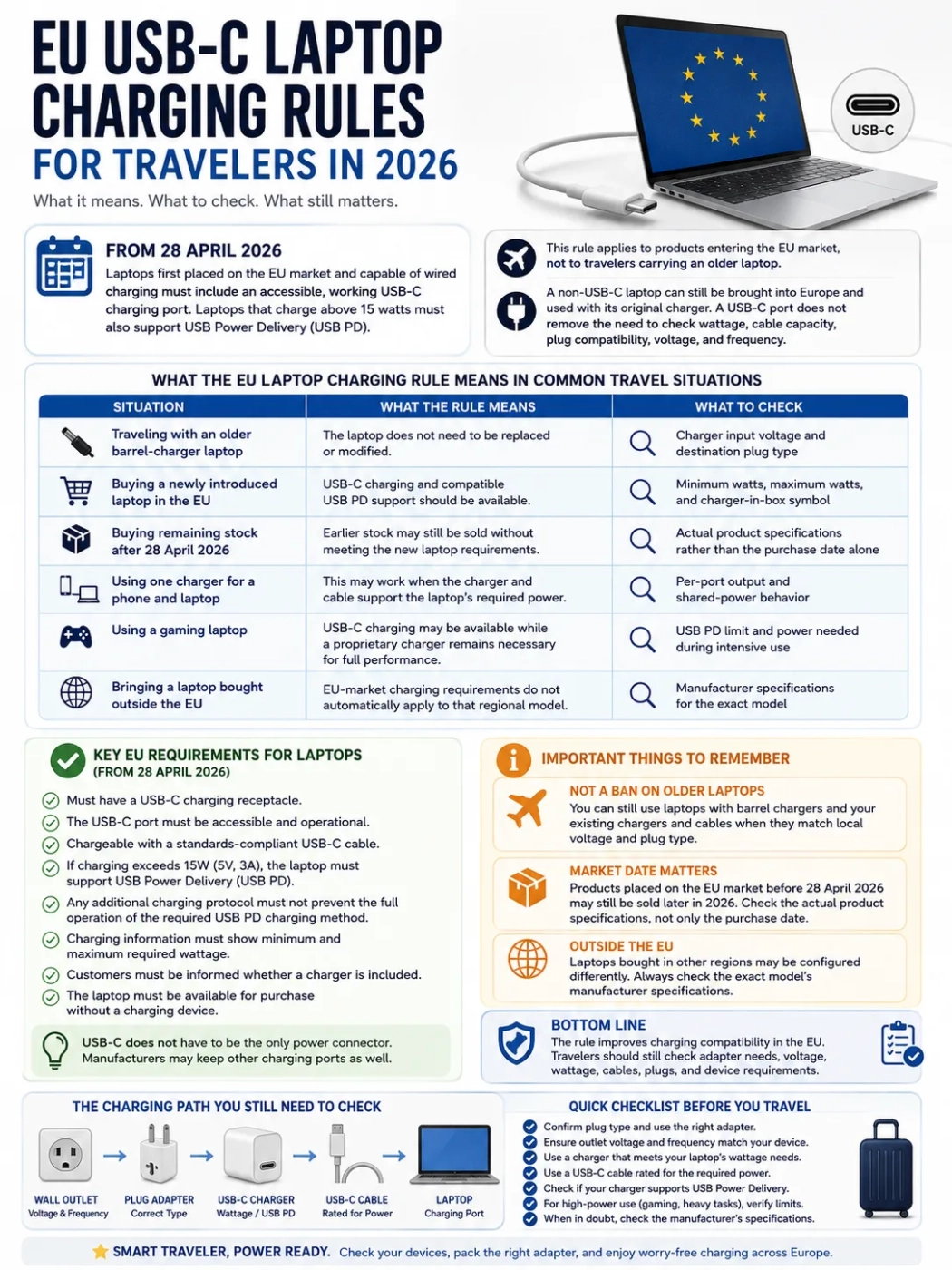
From 28 April 2026, covered laptops placed on the European Union market and capable of wired charging must include an accessible, operational USB-C charging receptacle. When wired charging exceeds 5 volts, 3 amperes, or 15 watts, the laptop must also support USB Power Delivery. These requirements apply to products placed on the EU market; they do not require travelers to replace older laptops they already own.
A traveler with an older barrel-charger laptop can continue to use it in Europe with its original charger when the charger accepts the local mains supply. For a newer USB-C laptop, the charging port is only one part of the travel setup: charger wattage, cable capacity, wall plug compatibility, voltage, and frequency still matter.
| Situation | What the rule means | What to check |
|---|---|---|
| Traveling with an older barrel-charger laptop | The laptop can still be used in the EU. | Charger input voltage and destination plug type |
| Buying a newly placed covered laptop in the EU | USB-C charging and the required USB PD support should be available. | Minimum charging power, maximum charging power, and charger-in-box information |
| Buying remaining stock after 28 April 2026 | Products placed on the EU market before the deadline may still be sold. | Actual charging ports and product specifications |
| Using one charger for a phone and laptop | One charger can serve both when its USB PD output and cable meet the laptop requirement. | Per-port output and shared-power behavior |
| Using a gaming or workstation laptop | USB-C charging can coexist with a higher-power proprietary input. | USB PD limit and power required during intensive use |
| Bringing a laptop bought outside the EU | The regional model should be checked from its own specifications. | Exact model number, included charger, and supported charging ports |
What Changed for Laptops on 28 April 2026?
The laptop stage of the EU Common Charger rules took effect on 28 April 2026. It covers laptops within the relevant EU radio-equipment rules when they have a rechargeable battery and can be charged through a wired connection.
A covered laptop must meet these charging requirements:
- It must include a USB-C charging receptacle.
- The USB-C receptacle must remain accessible and operational.
- The laptop must be chargeable with a standards-compliant USB-C cable.
- If wired charging exceeds 5V, 3A, or 15W, the laptop must support USB Power Delivery.
- Any additional proprietary charging protocol must leave the required USB PD charging method fully functional.
- Product information must identify the minimum charging power and the power required for maximum charging speed.
- The buyer must be told whether a charging device is included.
- The covered laptop must be offered for purchase without a charging device.
USB-C does not have to be the laptop's only power connector. A manufacturer can retain a barrel connector, magnetic connector, docking connector, or another proprietary input while also providing the required USB-C charging solution.
Which Laptops Are Affected?
The rule is tied to the EU market rather than to border entry or personal luggage. A traveler can bring an older non-USB-C computer into the EU and continue using it. Its original charging brick remains usable when its electrical input range matches the local mains supply and its plug can be connected correctly.
The market date is also different from the purchase date. A laptop placed on the EU market before 28 April 2026 can remain in legal stock and be sold later. During 2026, a shop can therefore have both older stock and newly placed products subject to the laptop charging requirements.
For a laptop purchased outside the EU, use the specification for that exact regional model. Product families can be sold with different chargers, power cords, plug heads, or port configurations in different markets.
The Travel Charging Path
The EU rule standardizes the laptop-side charging connection for covered products. International travel still involves several independent electrical specifications:
- The plug type used at the destination
- The charger's accepted AC input voltage and frequency
- The USB PD output available from the selected charger port
- The cable's supported power
- The laptop's minimum charging power
- The power required for maximum charging speed
A plug adapter does not convert voltage. It changes the physical connection between the charger plug and the wall outlet.
USB-C and USB Power Delivery
USB-C identifies the connector system. Laptop charging power is determined by the USB Power Delivery profiles supported by the laptop, charger, and cable.
For covered laptops charging above 5V, 3A, or 15W, USB PD is part of the required charging solution. During charging, the laptop and charger negotiate a supported voltage and current combination. A charger's advertised maximum is therefore an available ceiling, not a fixed amount forced into every connected computer.
A 100W USB PD charger can serve a laptop whose supported charging range includes 65W. The laptop requests an appropriate level. A charger below the laptop's preferred power can produce slower charging, low-power warnings, charging only while the machine is idle, or continued battery drain during heavy work.
The laptop's own minimum and maximum charging figures are the best values to use when choosing a travel charger.
How to Read the EU Charging Label
Covered products must provide charging information that includes a minimum power value and the power required for maximum charging speed. For travelers, these figures give a direct way to compare a laptop with a USB-C charger.
The minimum power represents the power needed to keep the laptop operating while also providing enough additional power for its battery to begin charging. A laptop showing a 45W minimum should be paired with a charger that can supply at least that required level through a compatible USB PD profile.
The maximum power identifies the power needed to maintain operation while reaching the highest supported battery charging rate. A laptop labeled 45–100W may work from a compatible 65W charger, with charging speed below what a suitable 100W source can provide.
When USB PD applies, the charging information identifies that support. Manufacturers can also offer additional charging methods, including proprietary ones, as long as they preserve the required USB PD operation.
Buying a Laptop With or Without a Charger
The Common Charger rules require buyers to have the option of purchasing covered equipment without a charging device. If a seller also offers the product together with a charging device, the charger-free option must be available as well.
Packaging and distance-selling information must show whether a charging device is included. A manufacturer can still sell a bundle that contains a charger; charger inclusion is not mandatory for every unit.
The unbundling rule concerns the charging device, meaning the external power supply. Cable inclusion is a separate product decision. When buying a laptop without a charger, check whether the box contains a USB-C cable and whether that cable supports the laptop's required charging power.
Choosing a Charger From the Wattage Range
| Charger output | Likely result | Travel use |
|---|---|---|
| 30W | Below the stated 45W minimum; charging may be unavailable or limited to special low-power conditions. | Too low for use as the primary charger for this example laptop |
| 45W | Meets the stated minimum. | Suitable where minimum-power charging is enough |
| 65W | Falls within the stated charging range. | Useful for lighter travel when maximum charging speed is unnecessary |
| 100W | Meets the stated power for maximum charging speed. | Suitable when the charger port and cable also support 100W |
| 140W | Usable when it offers USB PD profiles compatible with the laptop. | Can also be useful for multi-device charging |
The wattage printed in large type on a charger is only part of the specification. Check which USB-C port provides that output and which USB PD profiles the charger supports.
The USB-C Cable Sets Its Own Limit
A laptop charger can reach its full output only through a cable designed for the required power. A lower-rated cable can reduce the available charging level even when the charger and laptop support more.
Before a trip, check:
- The cable's power rating
- Its USB-C connector arrangement
- Whether it is intended for the required USB PD level
- Any power marking on the cable or packaging
- The condition of both connectors and the cable jacket
USB-C cable labeling also has a separate EU timeline. Regulation (EU) 2025/2052 is scheduled to apply from 14 December 2028 and includes 60W or 240W markings for covered USB-C-to-USB-C cables. That future requirement should be kept separate from the laptop-side rules already in force in 2026.
Multi-Port GaN Chargers and Shared Power
A multi-port GaN charger can replace several charging bricks during a trip, but its total advertised output may be divided when several devices are connected.
| Connected devices | Possible distribution | Laptop effect |
|---|---|---|
| Laptop only | 100W to the primary USB-C port | Maximum laptop charging may be available |
| Laptop and phone | 65W to laptop, 30W to phone | Laptop charging can slow |
| Laptop, phone, and tablet | 65W, 20W, and 15W | Laptop remains powered but may charge more slowly |
| Two laptops | Power divided according to the charger's port rules | One or both machines may receive less than their preferred level |
Actual distributions vary by charger. The port-combination table printed on the unit or supplied by the manufacturer is the useful specification. Some chargers briefly renegotiate USB PD when another device is connected, which can make the charging icon disappear and return.
Gaming and Workstation Laptops Above 240W
The EU rules also cover qualifying laptops whose proprietary charging system exceeds 240W. European Commission guidance states that equipment requiring more than 240W is not exempt from the common charging requirements.
For a laptop whose maximum charging power is above 240W, the harmonized charging solution must be supported up to 240W. A manufacturer can also keep a 300W or other higher-power proprietary charging method.
This matters for gaming and workstation laptops because intensive processor and graphics workloads can exceed the power available through the harmonized USB PD path. The proprietary power brick may still be needed for full gaming performance, heavy rendering, high-performance operating modes, or maximum charging speed under load.
A smaller USB-C charger can still be useful for office work, web browsing, standby charging, or charging while the laptop is switched off, depending on the laptop's stated charging range and operating behavior.
Charging Rules Do Not Define Data or Video Features
The 2026 common charging requirements address charging interfaces and charging communication. They do not set one data or display feature set for every USB-C port.
A laptop's USB-C ports can differ in support for:
- Thunderbolt
- USB4 data rates
- DisplayPort or other video output
- External monitors
- Docking stations
- High-speed storage
- Power input
Check the port symbols and the laptop specification when a trip depends on a dock, external display, fast storage device, or charging through a particular USB-C connector.
EU Wall Outlets Still Vary by Country
Most EU countries use mains electricity around 230V at 50Hz, but the wall-socket systems are not identical across the Union. Type C, Type E, and Type F are widespread. Type G is used in Ireland, Malta, and Cyprus; Type L appears in Italy; Type K is used in Denmark.
A USB-C laptop charger can therefore be electrically suitable for several countries while still needing a different physical plug adapter on part of the route.
Read the Charger Input Label
A common international laptop charger is marked:
Input: 100–240V, 50/60Hz
| Input label | Meaning for an EU trip | Likely requirement |
|---|---|---|
| 100–240V, 50/60Hz | Designed for both common voltage ranges and both common frequencies. | Plug adapter when the wall plug differs; voltage converter normally unnecessary |
| 220–240V, 50Hz | Electrically suited to normal EU mains power. | Plug adapter when the plug shape differs |
| 100–120V, 60Hz only | Outside the normal 230V EU supply range. | Use a suitable approved power solution rather than direct connection |
| Input information missing or unreadable | Wall-voltage compatibility cannot be confirmed from the charger. | Check the original documentation or use equipment with clear ratings |
A charger labeled only for 100–120V should not be connected directly to a 230V outlet through a mechanical plug adapter.
Modern laptop chargers commonly list 50/60Hz, which covers both mains frequencies. Frequency is more likely to create trouble with motors, clocks, and older frequency-sensitive equipment than with a switching laptop charger carrying a 50/60Hz input rating.
Hotels, Airports, Trains, and Airplane Power
The laptop rule governs covered products placed on the EU market. It does not set a required charging wattage for hotel USB ports, airport charging stations, train sockets, or airplane seat power.
A hotel USB-C port may be intended for phone charging and provide too little power for a laptop. A multi-standard wall socket can accept several plug shapes while still supplying the building's normal mains voltage. A personal charger with a known 100–240V input and suitable USB PD output gives a more predictable laptop charging setup.
Aircraft seat outlets can also have low power limits. High-output laptop chargers may cause the outlet to shut down, and passenger power can be unavailable during some phases of flight. Starting the trip with a charged battery remains useful even when the aircraft lists seat power.
Other Devices in the Same Travel Bag
| Device | Typical concern | What to check |
|---|---|---|
| Phone charger | Usually straightforward with worldwide input | Input: 100–240V, plug type, and USB output |
| Laptop charger | Wall voltage may be compatible while USB-C power is too low | AC input, USB PD output, selected port, and cable rating |
| Camera battery charger | Many support worldwide voltage, but models differ | Input range on the charger or charging base |
| Electric shaver | Some are dual voltage; some use a regional charging base | Voltage, frequency, and charging instructions |
| CPAP machine | Travel depends on the machine's power supply and approved accessories | Power-supply input, manufacturer instructions, plug fit, and backup power |
| Hair dryer | High wattage and single-voltage designs are common | Voltage range, dual-voltage selector, and wattage |
| Curling iron or straightener | Heating tools can be single voltage | Voltage label and selector position |
| Travel kettle or clothes iron | High power can exceed travel-adapter or converter limits | Voltage, wattage, grounding, and accessory rating |
The 2026 laptop rule does not alter the electrical requirements of unrelated appliances. Evaluate high-power heating devices from their own labels and wattage rather than from the laptop charging setup.
A Laptop Charging Kit for an EU Trip
- A USB PD charger that meets the laptop's stated minimum power
- A charger reaching the stated maximum when fastest charging is useful
- A USB-C cable rated for the intended charging power
- A plug adapter matching the destination wall outlet
- The proprietary power brick when a gaming or workstation laptop needs more than the USB-C travel setup can provide
- A spare cable when daily computer use is important
- A properly rated extension solution only where it is allowed and suitable for the local mains system
When using a multi-port charger, note which USB-C port provides the highest output and how that output changes when a phone, tablet, or second laptop is connected.
For multi-country EU travel, check the wall plug used in each destination. A Type E/F solution for much of continental Europe will not fit Type G outlets used in Ireland, Malta, and Cyprus.
What Changes on 14 December 2028?
A separate EU ecodesign regulation for external power supplies, charging equipment, and USB Type-C cables is scheduled to apply from 14 December 2028. It expands charger-side interoperability and information requirements beyond the laptop-side rules already in force.
For products within its scope, Regulation (EU) 2025/2052 introduces measures including:
- Broader use of USB-C or USB PD outputs on covered external power supplies
- Detachable output cables for interoperable external power supplies
- Power markings at USB-C and USB PD ports
- A Common Charger logo for covered interoperable power supplies
- 60W or 240W markings on covered USB-C-to-USB-C cables
- Updated energy-efficiency and no-load requirements
The regulation includes exemptions and transitional provisions for some products. These 2028 charger and cable requirements should be kept separate from the laptop USB-C requirements that started on 28 April 2026.
Frequently Asked Questions
Can I bring an old non-USB-C laptop into the EU?
Yes. The rule governs covered products placed on the EU market rather than personal laptops already owned by travelers. Use the original charger when its input rating matches the local mains supply and connect it through the correct plug adapter.
Must every laptop sold after 28 April 2026 have USB-C charging?
The date alone is not enough to classify a product. Laptops placed on the EU market before 28 April 2026 can remain in stock and be sold later. Newly placed covered laptops must meet the applicable common charging requirements.
Can a 65W charger charge a laptop labeled 45–100W?
Yes, when the charger provides a compatible USB PD profile within that laptop's supported range. Charging can be slower than with a suitable 100W source, especially during heavier use.
Is a 140W USB-C charger suitable for a 65W laptop?
A compatible USB PD charger can be used when it offers a power profile the laptop supports. The laptop negotiates the level it requires. The cable and selected charger port must also support that connection.
What happens with a laptop that uses more than 240W?
Covered laptops are still subject to the common charging rules. European Commission guidance states that a device with a proprietary charging requirement above 240W must also support the harmonized charging solution up to 240W.
Do I still need a travel plug adapter for an EU trip?
Possibly. USB-C describes the laptop charging connection, not the wall socket. Compare the charger's plug with the outlet used in each destination.
Do I need a voltage converter for a laptop charger?
Usually not when the charger states Input: 100–240V, 50/60Hz. A plug adapter may still be required for the local socket.
Does an EU-compliant USB-C charging port include Thunderbolt or video output?
Those features are outside the charging requirements. Check the laptop specification for Thunderbolt, USB4, DisplayPort, docking, or external-monitor support.
Can a new EU laptop still use a barrel charger?
Yes. A proprietary charging connector can remain available when the covered laptop also includes the required accessible and operational USB-C charging solution.