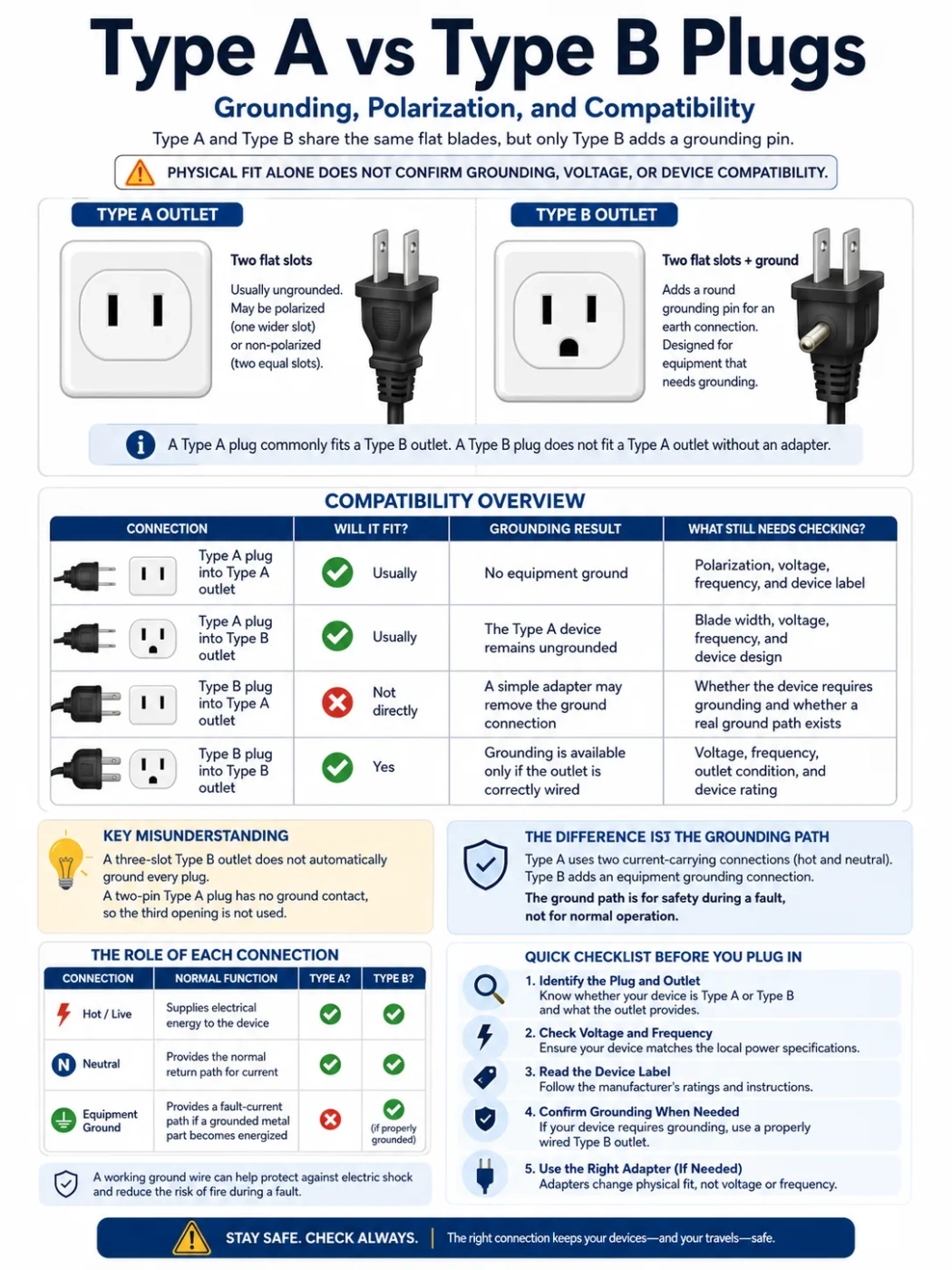
Type A and Type B plugs share the same two flat power blades, but they do not provide the same protection. Type A is normally ungrounded and may be polarized or non-polarized. Type B adds a round grounding pin and is intended for equipment that needs an earth connection. A Type A plug commonly fits a Type B power outlet, while a Type B plug does not fit a Type A outlet without an adapter. Physical fit alone does not confirm grounding, voltage, or device compatibility.
The Short Decision
| Connection | Will It Fit? | Grounding Result | What Still Needs Checking? |
|---|---|---|---|
| Type A plug into Type A outlet | Usually | No equipment ground | Polarization, voltage, frequency, and device label |
| Type A plug into Type B outlet | Usually | The Type A device remains ungrounded | Blade width, voltage, frequency, and device design |
| Type B plug into Type A outlet | Not directly | A simple adapter may remove the ground connection | Whether the device requires grounding and whether a real ground path exists |
| Type B plug into Type B outlet | Yes | Grounding is available only if the outlet is correctly wired | Voltage, frequency, outlet condition, and device rating |
The most common misunderstanding is that a three-slot Type B outlet automatically grounds every plug inserted into it. A two-pin Type A plug has no grounding contact, so the third outlet opening is not used. The device operates according to its original two-wire design.
What Type A and Type B Outlets Look Like
Real outlet faces can vary by building, manufacturer, age, and local electrical practice. Some Type A outlets have two equal-size slots, while polarized versions have one wider slot. Type B adds a round grounding opening below the flat slots. The presence of that opening does not prove that a working ground wire is connected behind the outlet.
The Difference Is the Grounding Path
Type A uses two current-carrying connections. One carries electrical energy into the device, and the other provides the normal return path. Type B adds a third connection for equipment grounding.
| Connection | Normal Function | Found on Type A? | Found on Type B? |
|---|---|---|---|
| Hot or live | Supplies electrical energy to the device | Yes | Yes |
| Neutral | Provides the normal return path for current | Yes | Yes |
| Equipment ground | Provides a fault-current path when a grounded metal part becomes energized | No | Yes, when the outlet is properly grounded |
The grounding connection is not intended to carry normal operating current. Its job appears during a fault. If a live conductor touches a grounded metal enclosure, the equipment grounding path can carry fault current back through the electrical system so a fuse or circuit breaker can disconnect the supply.
Without that path, an energized metal case may remain dangerous until current finds another route. That route could include a person touching the device and another grounded surface.
Why the Ground Pin Is Longer
On a typical Type B plug, the round ground pin extends farther than the flat blades. This design allows the grounding contact to engage before the current-carrying blades and remain connected until after they begin to withdraw. The feature only works when the outlet and wiring provide a real equipment ground.
Polarization Is Not the Same as Grounding
A polarized Type A plug has one flat blade wider than the other. The wider blade is intended for the neutral slot, while the narrower blade connects to the hot side. The plug fits only in one direction when used with a matching polarized outlet.
Polarization helps preserve the intended position of hot and neutral inside a device. It can keep switches, lamp holders, fuses, and internal components connected in the arrangement selected by the manufacturer.
Grounding performs a different task. It provides a separate safety path for fault current. A polarized two-pin plug can control orientation without providing an equipment ground.
- Polarization controls which blade connects to hot and neutral.
- Grounding provides a separate fault-current path.
- Voltage compatibility determines whether the device can accept the local electrical supply.
- Frequency compatibility matters for certain motors, clocks, transformers, and medical equipment.
A device can be polarized but ungrounded. It can also be grounded and polarized. These protections should not be treated as interchangeable.
Type A Plug in a Type B Outlet
A Type A plug normally fits into the two flat slots of a Type B outlet. No plug adapter is usually needed when the blade dimensions match.
The device does not gain grounding from the outlet because the Type A plug has no ground pin. This can be normal for a phone charger, camera charger, lamp, electric shaver, or another device designed to operate without an equipment ground.
Polarized Type A Plugs
Check whether one blade is wider. A polarized plug needs an outlet with a matching wider neutral slot. Do not file, bend, cut, or force the wide blade into a narrow opening. Altering the plug defeats its intended orientation and may expose internal parts to the hot side when the device appears to be switched off.
Non-Polarized Type A Plugs
Some Type A plugs have two blades of equal width and can be inserted in either direction. This arrangement is common on certain double-insulated devices and compact low-power chargers. Equal blades should not be used as proof that every part of the device is isolated or safe; the product label and condition still matter.
Type B Plug in a Type A Outlet
A Type B plug cannot enter a Type A outlet directly because there is no opening for the round ground pin. A three-to-two-prong adapter can make the shapes fit, but shape conversion and electrical protection are separate matters.
A plug adapter does not convert voltage. It also does not create an equipment grounding conductor where none exists.
Some three-to-two adapters include a metal tab or short grounding lead. That part only has a purpose when it is correctly connected to a verified grounded point. A screw, metal outlet box, or visible metal surface should not be assumed to be grounded.
Do not remove, cut, bend, or break the ground pin from a Type B plug. A device supplied with a three-pin plug may rely on that connection to protect an accessible metal enclosure, reduce electrical noise, or support the safety design of its power supply.
Why Some Two-Prong Devices Are Designed That Way
A two-prong plug is not automatically a sign of missing protection. Many devices use double insulation or reinforced insulation instead of an equipment grounding conductor.
A double-insulated design places more than one protective barrier between live electrical parts and surfaces that can be touched. This approach is often used for small chargers, personal-care devices, and certain power tools.
The difference is whether the product was designed for two-wire operation:
- A device manufactured with a two-pin plug may be intended to operate safely without a ground connection.
- A device manufactured with a three-pin plug may depend on the ground pin as part of its protective design.
- Replacing a grounded connection with an ungrounded adapter does not turn the device into a double-insulated product.
Look for the device label, manufacturer instructions, and the double-insulation symbol, commonly shown as a square inside another square. Do not assume that every plastic-bodied device is double-insulated.
A Three-Slot Outlet May Still Be Ungrounded
The front of an outlet only shows its physical format. It does not reveal the condition of the wiring behind it.
A Type B-style outlet may lack a working equipment grounding conductor because of old wiring, an incorrect replacement, a loose connection, or a damaged circuit. A plug-in outlet tester can identify several common wiring conditions, although it cannot detect every possible fault. Uncertain or damaged installations should be checked by a qualified electrician.
This matters most for devices such as:
- Desktop computers with metal cases
- Three-prong laptop power supplies
- Kitchen appliances with grounded plugs
- Metal-bodied power tools
- Surge protectors and grounded extension cords
- Medical equipment that requires a grounded supply
A grounded extension cord also loses its ground protection when it is connected through an ungrounded adapter. The presence of three openings at the far end of the extension cord does not restore the missing connection.
Grounding and GFCI Protection Do Different Jobs
A ground-fault circuit interrupter, often called a GFCI, monitors current flowing through the hot and neutral conductors. If it detects an imbalance that may indicate current leaking through another path, it can disconnect the circuit quickly.
A GFCI can reduce shock risk even where an equipment grounding conductor is absent. It does not provide a ground connection to the device.
| Function | Equipment Ground | GFCI Protection |
|---|---|---|
| Carries normal operating current | No | Monitors the operating conductors |
| Provides a metal-case fault path | Yes | No |
| Detects current imbalance | No | Yes |
| Creates a ground connection for a Type B plug | Yes, if correctly wired | No |
An outlet may therefore provide GFCI protection without providing equipment grounding. These conditions should not be described as electrically identical.
Voltage Is Separate From the Plug Shape
Type A and Type B plugs are commonly associated with 100–127V electrical systems, but the plug shape is not a voltage label. Countries using these outlets may have different standard voltages or frequencies, and local installations may not match assumptions based on appearance.
Read the input line on the charger, power supply, or appliance before connecting it.
Input: 100–240V, 50/60Hz
A label stating Input: 100–240V, 50/60Hz means the power supply is designed to accept the common voltage and frequency ranges used in many countries. A phone charger, laptop charger, tablet charger, or camera battery charger with this rating normally needs only a plug adapter when the outlet shape is different.
The adapter must still be rated for the device, fit securely, and preserve grounding when the original equipment requires it.
Input: 120V, 60Hz
A device marked only for 120V should not be connected directly to a 220–240V supply. A simple Type A or Type B travel adapter changes the physical connection but sends the local voltage directly to the device.
A suitable voltage converter may be needed, but conversion is often impractical for high-wattage appliances. The converter must support the appliance’s wattage, operating characteristics, and expected length of use.
Input: 100V
A 100V-only device should not automatically be treated as equivalent to a 120V device. Some products tolerate a limited difference, while others may run hotter, faster, or outside their intended rating. Follow the manufacturer’s input specification rather than relying on plug compatibility.
Where Travelers Commonly Encounter Type A and Type B
Type A and Type B outlets are widely associated with the United States, Canada, Mexico, and several destinations in Central America and the Caribbean. Type A also appears in Japan and parts of East Asia. The balance between Type A and Type B outlets can differ by country, building age, and local installation practice.
A destination using Type A or Type B does not automatically use 120V at 60Hz. Japan, for example, commonly uses 100V, and its frequency depends on the region. Other destinations may use 110V, 115V, 120V, or 127V systems.
Travel plans should therefore separate three questions:
- Does the plug fit the socket type?
- Does the device require a working ground connection?
- Does the device support the local voltage and frequency?
Device Compatibility: Low-Power Electronics and High-Power Appliances
| Device | Plug and Grounding Check | Voltage Check | Practical Guidance |
|---|---|---|---|
| Phone charger | Often two-prong and ungrounded | Look for 100–240V, 50/60Hz | A plug adapter is usually enough when the input range matches |
| Laptop charger | May use a two-pin or grounded three-pin input cable | Most modern units accept 100–240V, but the label must confirm it | Preserve the ground connection when the supplied cable uses Type B |
| Camera battery charger | Commonly two-prong | Many support 100–240V | Check both the charger label and the detachable cord, if present |
| Electric shaver | Often two-prong | May be universal voltage, dual voltage, or single voltage | Do not assume that all bathroom appliances accept multiple voltages |
| Hair dryer or curling iron | Plug shape varies; some include added shock protection | Frequently single voltage unless marked dual voltage | High-power appliances need close label and wattage checks |
| Kettle or clothes iron | May require grounding | Usually designed for one voltage system | Using a local appliance is often safer than relying on a travel converter |
| CPAP machine | May use a grounded or ungrounded external power supply | Check the medical power supply label and manufacturer instructions | Confirm plug fit, voltage, grounding, humidifier wattage, and backup needs |
| Desktop computer | Commonly requires a grounded Type B connection | Some power supplies are auto-ranging; others have a manual selector | Do not use an ungrounded adapter for equipment designed with a ground pin |
Modern Chargers
Phone chargers, laptop power supplies, tablet chargers, USB charging blocks, and camera chargers are often easier to travel with because many accept Input: 100–240V, 50/60Hz. Their lower power demand also makes them easier to use with compact travel adapters.
A three-prong laptop cable should not be replaced with an ungrounded travel connection simply because the power brick accepts universal voltage. Universal voltage and equipment grounding describe different parts of compatibility.
Heat-Producing Appliances
Hair dryers, curling irons, hair straighteners, kettles, and clothes irons draw much more power than ordinary chargers. They are also more likely to be single voltage.
A 120V hair dryer connected to a 230V supply can overheat or fail quickly. A dual-voltage hair tool must be set to the correct voltage position when it uses a manual selector.
Always check the device label before using high-power appliances abroad.
Motor-Driven and Frequency-Sensitive Equipment
Frequency is measured in hertz. Type A and Type B systems may operate at 50Hz or 60Hz depending on the country or region.
Most modern electronic chargers accept both frequencies when the label states 50/60Hz. Some motors, timers, older transformers, turntables, clocks, pumps, and medical devices may behave differently on the wrong frequency even when the voltage is correct.
A voltage converter usually does not change frequency. Equipment that requires one specific frequency needs separate confirmation from its manufacturer.
Travel Adapters That Preserve Grounding
Travel adapters can be divided by the connection they actually provide.
Two-Pin Shape Adapter
This adapter only changes the physical arrangement of the blades. It may be suitable for a double-insulated Type A device, but it is not suitable for preserving the ground connection of a Type B appliance.
Grounded Pass-Through Adapter
A grounded adapter has a ground contact on both its input and output sides. It can preserve grounding only when all parts of the connection are compatible:
- The original device plug includes a working ground contact.
- The adapter carries that contact through its internal construction.
- The wall outlet supports the adapter’s ground connection.
- The building wiring provides a working equipment ground.
A universal-looking adapter may accept a Type B plug while offering no usable ground at the destination outlet. Check the product’s grounding path rather than judging it by the number of openings.
Adapter With USB Charging Ports
An adapter with USB ports contains its own power supply for those ports. Its USB voltage rating is separate from the AC outlet section. Check the total USB output, supported charging protocols, AC current limit, grounding arrangement, and destination voltage rating.
The presence of USB charging does not mean the AC outlet converts voltage for a hair dryer, kettle, or other appliance.
Compatibility Problems That Can Look Harmless
- Assuming a Type A plug becomes grounded when inserted into a Type B outlet
- Using a three-to-two-prong adapter without a verified ground connection
- Removing the round pin from a Type B plug
- Forcing a polarized Type A plug into a non-polarized outlet
- Using a grounded extension cord through an ungrounded adapter
- Assuming a three-slot outlet is correctly grounded because it accepts the plug
- Confusing GFCI protection with equipment grounding
- Using a 120V appliance on a 220–240V supply because the plug adapter fits
- Ignoring a 50Hz or 60Hz limitation on a motor-driven device
- Hanging a heavy universal adapter from a loose wall outlet
A loose connection can create heat, arcing, and intermittent charging. Stop using an outlet or adapter that feels unstable, shows discoloration, produces a burning smell, sparks repeatedly, or becomes unusually hot.
A Six-Step Check Before Connecting a Device
-
Identify the plug.
Two flat blades indicate Type A. Two flat blades plus a round ground pin indicate Type B.
-
Check blade width.
A wider neutral blade means the Type A plug is polarized and must enter the outlet in the correct direction.
-
Determine whether grounding is part of the device design.
Preserve the ground connection when the device was supplied with a Type B plug or grounded input cable.
-
Inspect the outlet and adapter.
Do not use loose, cracked, scorched, wet, or damaged electrical connections.
-
Read the device label.
Confirm the accepted voltage, frequency, current, and wattage. Look for Input: 100–240V when using a charger across different voltage systems.
-
Choose the correct travel equipment.
Use a shape adapter for plug mismatch, a grounded adapter when ground continuity is required, and a voltage converter only when the device and converter are suitable for each other.
Frequently Asked Questions
Can a Type A plug be used in a Type B outlet?
Usually, yes. The two flat blades commonly fit the flat slots of a Type B outlet. The Type A device remains ungrounded because it has no round ground pin. Voltage and frequency must still match the device label.
Does a Type A plug receive grounding from a Type B outlet?
No. The outlet may provide a ground contact, but a Type A plug has no connection to it. The device continues to operate as a two-wire appliance.
Can a Type B plug be used with a two-prong adapter?
The plug may physically fit through an adapter, but a basic adapter can remove the equipment ground. It should not be used for a device that requires grounding unless the adapter is designed to preserve ground and connects to a verified grounded outlet.
Are all Type A plugs polarized?
No. Polarized Type A plugs have one blade wider than the other. Non-polarized versions have two equal-width blades and may fit in either direction.
Is every Type B outlet grounded?
No. A Type B-style outlet can be incorrectly wired or installed on a circuit without a working equipment grounding conductor. The outlet shape alone cannot confirm its wiring condition.
Does a plug adapter convert 230V to 120V?
No. A plug adapter does not convert voltage. A separate voltage converter may be needed for a single-voltage 120V device used on a 220–240V supply.