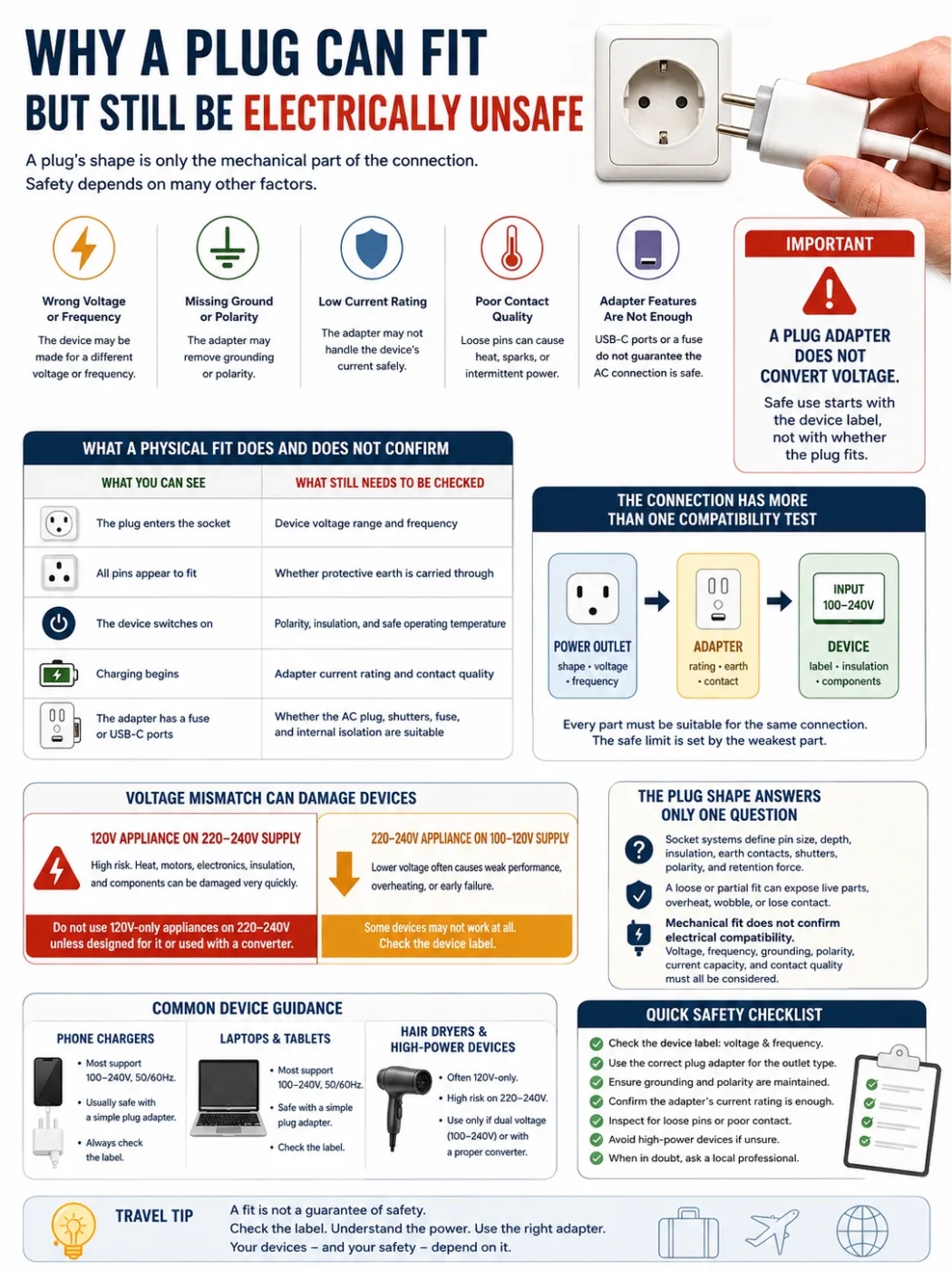
A plug can slide into a power outlet and still be unsafe because plug shape is only the mechanical part of the connection. The device may be built for the wrong voltage or frequency, the travel adapter may remove grounding or polarity, its current rating may be too low, or the pins may make a loose, heat-producing contact. A plug adapter does not convert voltage. Safe use starts with the device label, not with whether the plug fits.
| What you can see | What still needs to be checked |
|---|---|
| The plug enters the socket | Device voltage range and frequency |
| All pins appear to fit | Whether protective earth is carried through |
| The device switches on | Polarity, insulation, and safe operating temperature |
| Charging begins | Adapter current rating and contact quality |
| The adapter has a fuse or USB-C ports | Whether the AC plug, shutters, fuse, and internal isolation are suitable |
The Connection Has More Than One Compatibility Test
The wall socket, plug adapter, power cord, charger, and device form one connection. The safe limit is set by the weakest part. A wall outlet rated for a high current does not give a small travel adapter the same rating, and a grounded wall socket does not help if the adapter fails to carry the earth connection to the device.
The Plug Shape Answers Only One Question
Plug types are designed around more than the outline of their pins. A socket system may also define pin thickness, insertion depth, insulation near the pin base, grounding contacts, shutters, polarity, and the amount of force needed to hold the plug securely.
A loosely matching plug may enter a socket without meeting those conditions. It may sit partly outside the faceplate, expose live metal during insertion, wobble under the weight of a charger, or touch the internal contacts with too little pressure. The device may still receive power, but the connection can remain unsafe.
Mechanical fit does not confirm electrical compatibility. Voltage, frequency, grounding, polarity, current capacity, and contact quality must be considered separately.
Wrong Voltage Can Damage a Device Very Quickly
A 120V Appliance on a 220–240V Supply
This is the higher-risk direction. A single-voltage hair dryer, curling iron, clothes iron, kettle, or other 120V appliance can overheat or fail when connected to a 220–240V power outlet through a simple plug adapter.
For a basic resistance heater, power rises with the square of the voltage. Applying close to twice the intended voltage can produce close to four times the intended heating power before a switch, fuse, thermal cutout, or other protection responds. Motors, electronic controls, capacitors, and insulation can also be damaged.
Do not use a 120V-only heat-producing appliance on a 220–240V supply unless the appliance is designed for that voltage or is powered through a suitable conversion device.
A 220–240V Appliance on a 100–120V Supply
Lower voltage often causes weak heating, slow operation, or no operation, but it is not a universal safety guarantee. A motor may fail to start, remain stalled, or run outside its intended conditions. Relays and electronic controls may operate unpredictably. A device that does not work normally should be disconnected rather than left powered in the hope that it will recover.
Read the Device Label Before Choosing the Adapter
The input label gives a better answer than the shape of the plug. Look on the charger body, power brick, appliance base, battery charger, or rating plate.
| Label example | What it usually means | Travel decision |
|---|---|---|
| Input: 100–240V, 50/60Hz | The power supply accepts the common travel voltage and frequency ranges shown | A suitable plug adapter is usually enough |
| Input: 120V, 60Hz | The device is intended for a 120V, 60Hz supply | Do not connect it directly to 220–240V |
| Input: 220–240V, 50Hz | The device is intended for a higher-voltage 50Hz supply | Check both voltage and device behavior before use on 100–120V or 60Hz |
| 120/240V with a selector | The appliance may support two voltage settings | Set the selector correctly before plugging it in |
| No readable rating label | Compatibility cannot be confirmed from appearance | Do not assume that an adapter makes it safe |
“Input: 100–240V” means the power supply can accept voltages within that printed range. It does not mean every part attached to it is universal. A detachable power cord, travel adapter, extension lead, or hotel socket still needs the right plug design, current rating, grounding arrangement, and physical condition.
The label may appear on the charger rather than the device. A laptop may operate from low-voltage DC supplied by its power brick, so the relevant travel rating is usually printed on the brick’s AC input side. The same principle applies to camera battery chargers, electric toothbrush bases, electric shaver chargers, and many CPAP power supplies.
Grounding Can Disappear Inside an Adapter
A three-pin device plug may enter a universal adapter even when the adapter does not provide a working earth path. Three holes on the adapter face show that the plug can be inserted; they do not prove that all three conductors are connected to the destination socket.
Class I Equipment
Class I equipment uses protective grounding as part of its fault protection. Metal-bodied appliances, desktop computers, some laptop power supplies, and other grounded equipment may rely on that connection. If a plug adapter changes a grounded plug into an ungrounded two-pin connection, an intended protection layer has been removed.
Class II Equipment
Class II equipment uses double or reinforced insulation and commonly carries a square-within-a-square symbol. A two-pin Class II charger is not unsafe merely because it has no earth pin. The important distinction is whether the device was designed to operate without protective earth.
A residual-current device, RCD, or ground-fault circuit interrupter, GFCI, can provide added protection against some leakage faults. It does not create an earth conductor for equipment that requires one. Fault-current protection and protective grounding perform different jobs.
Polarity May Be Lost Even Though the Device Works
Some plug systems are polarized so the live and neutral conductors enter the appliance in an intended orientation. Other plug systems are reversible. A polarized plug connected through a reversible travel adapter may therefore lose its original orientation.
Many modern double-insulated chargers are designed to operate from either orientation. Polarity can matter more in appliances where an internal switch or fuse is intended to interrupt the live conductor. The appliance may still run normally while parts of its internal circuit remain energized in a way the original plug system was designed to avoid.
This is another reason that “it switched on” is not a complete safety test.
A Loose Fit Can Become a Heat Source
Current must pass through small metal contact areas inside the socket and adapter. When those contacts are tight and clean, resistance stays low. Thin pins, worn socket contacts, oxidation, partial insertion, poor dimensional fit, or the weight of a large adapter can increase contact resistance.
Heat produced at a connection rises with current and resistance. A phone charger may place a modest load on the connection, while a kettle or hair dryer can expose a poor contact much faster. The appliance may continue operating while the plug face, adapter body, or wall socket becomes dangerously hot.
Signs of a Failing Connection
- The plug or adapter does not remain firmly seated.
- Part of a live pin remains exposed after insertion.
- The adapter becomes hot rather than mildly warm.
- There is a smell of heated plastic or insulation.
- Power cuts in and out when the adapter moves.
- The socket shows browning, melting, or scorch marks.
- There is buzzing, crackling, or repeated arcing.
Disconnect the device if the plug, adapter, or socket becomes unusually hot, loose, discolored, or noisy. Do not test a suspect socket with another high-power appliance.
The Adapter Rating May Be Lower Than the Outlet Rating
Travel adapters are marked with a maximum voltage, current, power, or a combination of these. These figures are limits, not performance targets. The usable limit of the full connection is the lowest rating among the wall outlet, adapter, extension lead, cable, charger, and appliance.
Electrical power can be estimated with:
Watts = volts × amps
A current rating cannot be converted into a universal watt limit without considering voltage. An adapter marked 10A has a different theoretical power level on 120V than on 230V. The printed instructions may also set a lower limit for continuous use, USB charging, AC passthrough, or particular plug configurations.
Do not judge capacity by size alone. A compact adapter may charge a phone safely within its rating but may not be intended for a kettle, clothes iron, hair dryer, space heater, or other high-power appliance.
A Fuse Does Not Correct the Supply Voltage
A fuse opens the circuit under certain overcurrent or fault conditions. It does not reduce 230V to 120V, change 50Hz to 60Hz, restore a missing earth connection, or improve loose pin contact.
A plug adapter does not convert voltage. The presence of a fuse does not change that rule. A 120V-only appliance can be damaged by a 230V supply before a plug fuse provides the outcome a traveler expects.
In plug systems that use fused plugs, the fuse must also be the proper type and rating for the product. A fuse-shaped component, a printed rating, or a removable fuse drawer is not proof that the fuse and plug construction are suitable.
Universal and USB-C Adapters Add More Interfaces
An all-in-one adapter may combine sliding destination pins, a multi-standard input socket, AC passthrough, a fuse, and several USB or USB-C charging ports. Each function adds contacts, conductors, shutters, locks, and insulation boundaries inside a small enclosure.
That does not make every universal adapter unsafe. It does mean that “universal” describes the range of plug shapes the product tries to accept, not a guarantee of universal voltage, grounding, polarity, current capacity, or construction quality. Do not assume that a hotel’s universal-looking socket changes the voltage.
Check the AC Side Separately from USB-C
USB-C Power Delivery controls the low-voltage output supplied to compatible electronics. It does not confirm that the adapter’s mains pins have the correct dimensions, that the universal socket blocks access to live contacts, or that the AC input and USB output are properly isolated.
A USB-C port can charge a phone or laptop while the AC passthrough section has a different current limit. Read both sets of markings. Do not treat the USB output wattage as the safe wattage for an appliance connected to the AC socket.
Avoid Adapter Stacking
Plugging one adapter into another increases leverage on the wall socket and adds another pair of contacts that can loosen or heat. It can also make grounding and polarity harder to verify. Use one suitable destination adapter rather than building a chain of converters and adapters.
50Hz and 60Hz Can Matter After Voltage Is Correct
Frequency tells you how often alternating current changes direction each second. Many switch-mode power supplies for phones, tablets, laptops, cameras, and CPAP machines accept both frequencies when the label states 50/60Hz.
Other devices can depend on frequency for speed, timing, cooling, or transformer operation. Examples include some synchronous clocks, older transformers, pumps, fans, turntables, and motor-driven appliances. A device may receive the correct voltage and still run at the wrong speed, keep poor time, overheat, or fail to start properly.
Use the printed frequency rating rather than assuming that every appliance tolerates both systems.
Different Devices Create Different Travel Risks
| Device | When a plug adapter may be enough | When more caution is needed | What to check |
|---|---|---|---|
| Phone or tablet charger | The charger says Input: 100–240V, 50/60Hz | The charger is damaged, unmarked, or used through a loose adapter | Input range, USB output, adapter fit |
| Laptop charger | The power brick accepts the local voltage and frequency | The original plug is grounded but the travel adapter removes earth | AC input label, grounding, cable rating |
| Camera battery charger | The charger has a wide input range | The charger is region-specific or the rating plate is unreadable | Charger label, not the camera battery voltage |
| CPAP machine | The supplied power unit accepts the destination supply | Grounding, humidifier load, medical guidance, or power reliability needs are unclear | Power unit label and manufacturer instructions |
| Hair dryer or curling iron | The appliance is genuinely dual voltage and set correctly | It is marked 120V only and the destination uses 220–240V | Voltage selector, wattage, frequency if motor-driven |
| Kettle or clothes iron | The appliance is designed for the destination voltage and the adapter is rated for the load | A compact universal adapter is used without confirming its AC rating | Voltage, watts, amps, continuous-use limit |
| Electric shaver or toothbrush base | The charger supports the local supply | The device connects directly to mains or uses a region-specific charging base | Label on the base or charger |
| Clock or motor-driven device | The label allows both the local voltage and frequency | The device relies on mains frequency for timing or motor speed | 50Hz / 60Hz rating |
Modern phone and laptop chargers are often lower-risk because many use wide-range power supplies. The risk is not zero: poor adapter contact, damaged insulation, blocked ventilation, counterfeit components, and lost grounding can still create problems.
Hair dryers, curling irons, straighteners, kettles, and clothes irons deserve more attention because they draw more power or create heat directly. A device advertised as “travel” is not automatically dual voltage. The rating label and selector position decide.
Plug Adapter, Voltage Converter, and Transformer
Plug Adapter
A plug adapter changes the physical connection so one plug shape can enter another socket type. It normally leaves the supply voltage and frequency unchanged.
Voltage Converter
A voltage converter changes the voltage for a supported type of load. Some lightweight electronic converters are intended only for particular appliances or short operating periods. Wattage alone may not establish compatibility with motors, electronic controls, medical equipment, or devices with variable power demand.
Transformer
A transformer can step AC voltage up or down. It must be sized for the load and used within its operating limits. It does not normally correct a 50Hz / 60Hz mismatch, and it may be heavy for travel.
When a charger already states Input: 100–240V, 50/60Hz, voltage conversion is usually unnecessary. The charger performs its own conversion to the low-voltage DC required by the device.
A 30-Second Check Before Plugging In
- 1. Read the local supply information. Confirm the destination voltage, frequency, and common socket type.
- 2. Read the device or charger label. Find the input voltage range, frequency, watts, amps, and any voltage selector.
- 3. Decide whether the device needs earth. Do not reduce a grounded plug to an ungrounded connection without confirming that the equipment is designed for it.
- 4. Check the adapter markings. Confirm the AC rating, destination plug type, fuse requirements, and whether grounding is supported.
- 5. Inspect the fit. The adapter should sit firmly, fully, and without exposing live metal.
- 6. Watch the first use. Stop if there is excessive heat, smell, noise, unstable power, or visible damage.
When Not to Use the Connection
- The device voltage range does not include the local supply.
- The rating label is missing or unreadable.
- A required earth connection is lost through the adapter.
- The plug cannot be inserted fully or falls out under its own weight.
- The adapter has cracked plastic, bent pins, a loose slider, or a damaged fuse holder.
- Live metal appears reachable during normal insertion or removal.
- A high-power appliance exceeds the adapter’s printed limit.
- Two or more plug adapters must be stacked to make the connection.
- The plug, adapter, or socket becomes unusually hot or discolored.
- The device behaves differently from normal, especially a motor, heater, or medical device.
Frequently Asked Questions
If the Plug Fits, Will the Device Work?
It may work, but fit does not confirm voltage, frequency, grounding, polarity, current capacity, or safe contact. Check the device label and adapter rating first.
Can a Travel Adapter Change 230V to 120V?
No. A plug adapter does not convert voltage. A suitable voltage converter or transformer is needed when the device cannot accept the local supply.
Does a Three-Pin Adapter Guarantee Grounding?
No. The adapter may accept a three-pin plug without carrying the earth conductor to the destination socket. Check whether the adapter explicitly supports grounding for that plug configuration.
Is a 100–240V Phone Charger Safe in Every Country?
The wide input range usually solves the voltage issue, but the charger still needs a suitable plug adapter, secure contact, proper insulation, and an undamaged power outlet.
Can a Fuse Protect a 120V Appliance from 230V?
Not reliably. A fuse responds to certain current conditions; it does not reduce the supply voltage. The appliance may be damaged before the fuse operates.
Is a Loose Adapter Acceptable If Charging Continues?
No. A loose connection can create resistance, heating, arcing, and intermittent power. Disconnect it and use a properly fitting adapter and socket.