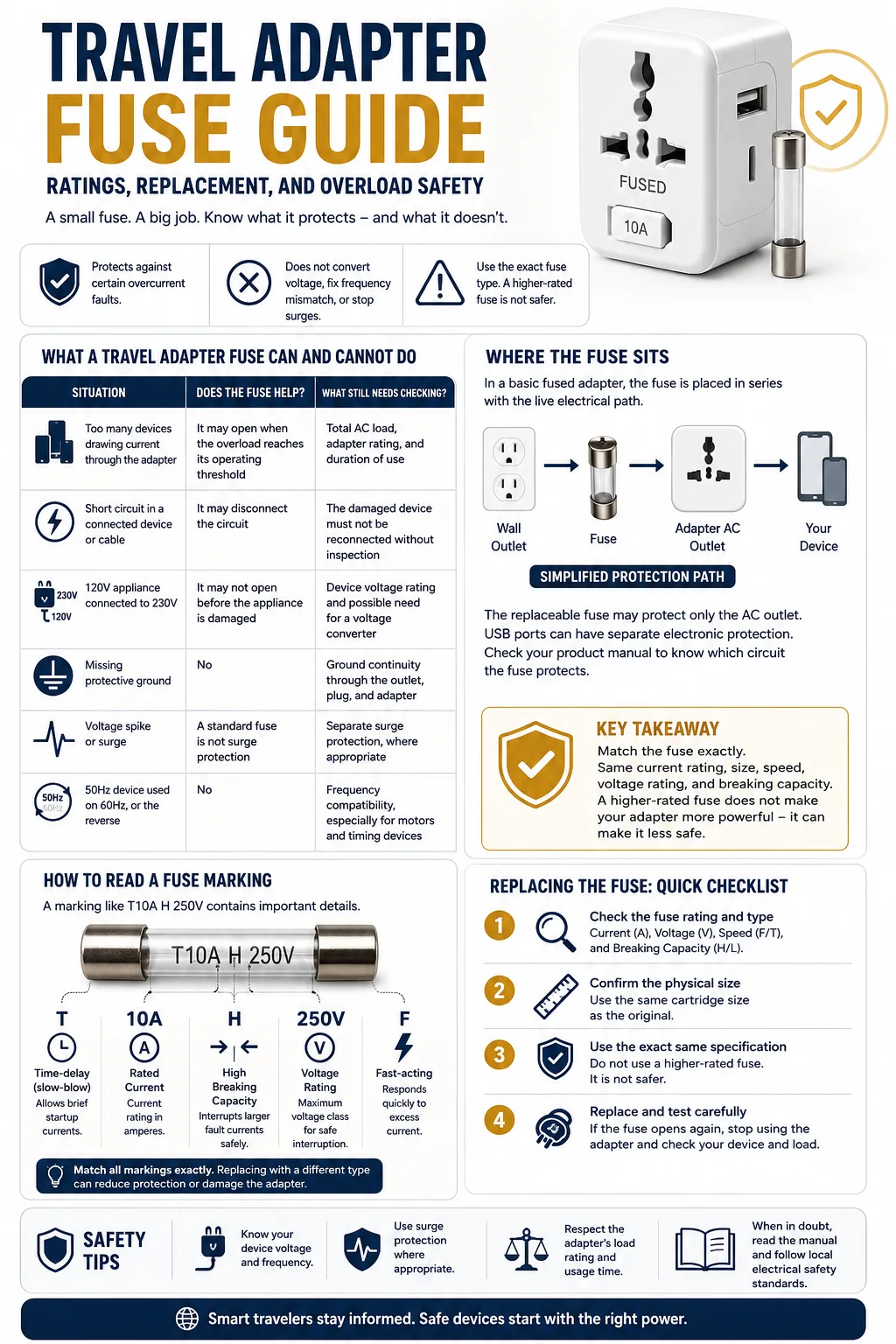
A travel adapter fuse should be replaced only with the exact type specified for that adapter: the same current rating, physical size, speed characteristic, voltage rating, and breaking capacity. A higher-rated fuse does not make an adapter more powerful. It can allow the adapter’s contacts, wiring, or plastic body to overheat before the fuse opens.
The fuse protects against certain overcurrent faults, but it does not solve every travel-power problem. A plug adapter does not convert voltage. It also does not correct a 50Hz / 60Hz mismatch, restore a missing ground connection, or guarantee protection from voltage surges.
| Situation | Does the fuse help? | What still needs checking? |
|---|---|---|
| Too many devices drawing current through the adapter | It may open when the overload reaches its operating threshold | Total AC load, adapter rating, and duration of use |
| Short circuit in a connected device or cable | It may disconnect the circuit | The damaged device must not be reconnected without inspection |
| 120V appliance connected to 230V | It may not open before the appliance is damaged | Device voltage rating and possible need for a voltage converter |
| Missing protective ground | No | Ground continuity through the outlet, plug, and adapter |
| Voltage spike or surge | A standard fuse is not surge protection | Separate surge protection, where appropriate |
| 50Hz device used on 60Hz, or the reverse | No | Frequency compatibility, especially for motors and timing devices |
Where the Fuse Sits in a Travel Adapter
In a basic fused adapter, the fuse is placed in series with the live electrical path. Current entering through the wall-plug pins must pass through the fuse before reaching the adapter’s AC outlet.
The exact internal arrangement depends on the product. In some adapters, the replaceable fuse protects only the AC pass-through outlet. The USB-A and USB-C charging section may use separate electronic overcurrent and temperature protection. In other designs, an input fuse may disconnect most or all functions.
This difference explains why an adapter can sometimes continue charging through USB after its AC fuse has opened. The reverse can also occur if the USB power circuit shuts down because of heat while the AC outlet remains energized. The product instructions should identify which circuit the replaceable fuse protects.
How to Read the Markings on a Fuse
A marking such as T10A H 250V contains several separate specifications. Matching only the number “10” is not enough when choosing a replacement.
| Marking | Meaning | Why it matters |
|---|---|---|
| 2.5A, 3A, 7A, 10A or 13A | Rated current in amperes | A replacement with a higher current rating may fail to protect the adapter as designed |
| 125V or 250V | Maximum voltage class for safe interruption | This is not the operating voltage produced by the fuse |
| F | Fast-acting fuse | Responds more quickly to excess current than a time-delay type |
| T | Time-delay or slow-blow fuse | Allows certain brief startup currents without opening immediately |
| H | High breaking capacity in commonly used marking systems | Designed to interrupt a larger fault current without rupturing unsafely |
| L | Lower breaking capacity in commonly used marking systems | Must not replace a higher-capacity fuse unless the manufacturer permits it |
| 5 × 20 mm or another size | Physical dimensions | A fuse that fits loosely or requires force is not the correct part |
Current Rating Is Not an Instant Trip Point
A 10A fuse does not necessarily open the moment current reaches exactly 10A. Fuse operation follows a time-current curve. A small overload may take time to open the fuse, while a large fault can cause it to open quickly.
This is one reason a travel adapter can become noticeably warm during a sustained overload even though the fuse has not yet opened. The adapter’s printed maximum current and wattage remain operating limits, not targets to exceed until the fuse blows.
What the 250V Marking Means
A fuse marked 250V is designed to interrupt a fault in a circuit up to its stated voltage class when the other specifications are also suitable. It does not reduce 230V to 120V, produce 250V, or make a single-voltage appliance safe worldwide.
Never treat the fuse voltage marking as proof that the connected appliance is voltage-compatible.
Fast-Acting and Time-Delay Fuses Are Not Interchangeable
Some equipment draws a brief surge of current when first switched on. Power supplies, transformers, motors, and compressors can have an inrush current above their normal running current.
A time-delay fuse may be selected to tolerate that short startup event. A fast-acting fuse with the same amp rating may open unnecessarily. Replacing a fast fuse with a time-delay fuse can create the opposite problem by allowing an overload to continue longer than the adapter was designed to tolerate.
Glass and Ceramic Bodies
Glass fuses allow the fuse element to be seen, but appearance alone does not establish its rating or breaking capacity. Ceramic fuses may contain arc-suppressing filler and can be designed for higher fault currents.
A glass fuse and a ceramic fuse of the same size and amperage should not be treated as equivalent unless the adapter instructions specify that substitution.
Fuse Rating, Voltage, and Available Wattage
The current drawn by a device can be estimated with this relationship:
Current in amperes = Power in watts ÷ Supply voltage
The same relationship can be rearranged:
Power in watts = Supply voltage × Current in amperes
The table shows the mathematical power represented by several current ratings. These numbers are not automatic approval to operate an adapter at that load.
| Current rating | 100V | 120V | 230V | 240V |
|---|---|---|---|---|
| 2.5A | 250W | 300W | 575W | 600W |
| 3A | 300W | 360W | 690W | 720W |
| 6A | 600W | 720W | 1,380W | 1,440W |
| 7A | 700W | 840W | 1,610W | 1,680W |
| 10A | 1,000W | 1,200W | 2,300W | 2,400W |
| 13A | 1,300W | 1,560W | 2,990W | 3,120W |
The adapter’s own rating may be lower than the calculated value. For example, a product may contain a 10A fuse but carry a lower continuous wattage limit because of its contacts, internal wiring, thermal design, or socket construction.
Always follow the lowest applicable limit:
- The maximum current printed on the travel adapter
- The maximum wattage printed for the local supply voltage
- The rating of the adapter’s AC outlet
- The rating of the replaceable fuse
- Any lower limit stated in the instructions
Why the Same 10A Adapter Has Different Wattage Limits Abroad
A 10A load at 120V represents about 1,200W. The same current at 230V represents about 2,300W. This does not mean that a 120V appliance can be moved to a 230V country simply because the adapter carries a 10A or 250V marking.
The appliance still needs the correct supply voltage. A 1,500W, 120V-only hair dryer should not be connected directly to 230V through a mechanical adapter.
The Adapter Rating and Fuse Rating Are Different Specifications
The fuse protects the adapter under specified fault conditions. The adapter rating describes the load the complete product is intended to carry. These values may be related, but they are not interchangeable.
For example, an adapter may be marked:
- Maximum AC load: 10A
- Maximum power: 1,200W at 120V
- Maximum power: 2,300W at 230V
- Replaceable fuse: T10A H 250V
The 10A fuse does not authorize a larger load than the product label. It also does not guarantee that operating continuously near the maximum is suitable in every wall socket or room temperature.
A compact adapter can develop heat at the plug pins, socket contacts, USB power circuit, or fuse holder. A fuse mainly responds to current. It may not detect a poor contact that is heating locally while the total current remains below its operating threshold.
Total Load Means the Whole Adapter, Not Each Socket
Multi-outlet travel adapters often show one total AC current limit. That limit is usually shared by every AC socket connected to the same input, not repeated independently for each outlet.
If a 10A adapter has two AC outlets, it should not be read as two separate 10A supplies. The combined current remains limited by the adapter’s input, internal conductors, contacts, and fuse.
Example of a Shared Load
| Connected equipment | Input power |
|---|---|
| Laptop power supply | 100W |
| Phone charger | 30W |
| Camera battery charger | 20W |
| Travel kettle | 1,200W |
| Total | 1,350W |
At 120V, a 1,350W load draws about 11.25A. It exceeds a 10A adapter rating even though none of the individual plugs appears unusual.
At 230V, 1,350W draws about 5.87A, but the kettle and every other device must still be rated for 230V. Current calculation cannot replace a voltage-compatibility check.
USB Port Ratings Need a Separate Check
A USB-C port marked 65W, 100W, or 140W describes the maximum negotiated output available from that charging section under stated conditions. It does not describe the AC socket capacity.
On multi-port chargers, the headline wattage may be available only when one port is used. Connecting several USB devices can divide the available output among the ports. The adapter’s USB system may also have its own temperature and overcurrent controls separate from the replaceable AC fuse.
Which Travel Devices Put the Most Stress on a Fuse?
Modern phone chargers, laptop chargers, tablet chargers, camera chargers, and many CPAP power supplies usually draw much less current than heating appliances. Their voltage labels still need to be checked, but they are less likely to overload a properly rated adapter when used alone.
| Device group | Examples | Main concern |
|---|---|---|
| Lower-power electronics | Phone charger, tablet charger, camera charger, electric toothbrush charger | Voltage input range and plug fit |
| Medium-power electronics | Laptop charger, gaming laptop power supply, portable monitor, CPAP machine | Total load, grounding, and model-specific power requirements |
| High-power heating appliances | Hair dryer, curling iron, hair straightener, kettle, clothes iron, portable heater | High current, single-voltage designs, and sustained heat |
| Motor-driven or timing-sensitive equipment | Some shavers, fans, clocks, pumps, and older appliances | Voltage and 50Hz / 60Hz compatibility |
Hair Dryers, Kettles, and Irons
Heating appliances can use most or all of a travel adapter’s capacity by themselves. A 1,500W appliance draws:
- About 12.5A at 120V
- About 6.5A at 230V
A 1,500W load therefore exceeds a 10A adapter limit on a 120V supply. On a 230V supply, the current may fall below 10A, but a 120V-only appliance remains electrically incompatible and should not be connected directly.
Always check the device label before using high-power appliances abroad.
Phone and Laptop Chargers
Many modern chargers are marked Input: 100–240V, 50/60Hz. This normally means the power supply can accept the common voltage and frequency systems used in many destinations.
A compatible plug adapter may still be needed if the charger’s plug shape does not match the local power outlet. The travel adapter changes the physical connection only.
Check the full input line rather than relying on the brand, connector type, or USB-C wattage. A charger marked only 120V should not be assumed to work on 230V.
CPAP Machines and Medical Equipment
Many CPAP power supplies accept 100–240V and 50/60Hz, but this should be confirmed on the exact machine, external power supply, humidifier, and accessory setup. Power requirements can differ between models.
Medical equipment may also require dependable grounding, a specific cable, or a battery plan for outages. A fused adapter does not provide a medical compatibility guarantee.
Electric Shavers and Motor-Driven Devices
Some electric shavers use universal-voltage charging electronics, while others are designed for one voltage. Motor speed, heat, timing, or performance can also be affected by frequency.
If the label lists both 50Hz and 60Hz, frequency is usually covered by the power supply. If it lists only one frequency, check the manufacturer’s instructions before use.
Why a Travel Adapter Fuse Blows
A fuse opening is evidence that the circuit experienced a condition outside its intended range. Replacing the fuse without identifying the cause can expose the replacement to the same fault.
The Combined Load Was Too High
This is common when a high-wattage appliance is connected with other devices. The overload may be obvious, such as a kettle and hair dryer used together, or less obvious when several moderate loads share one compact adapter.
A Connected Device or Cable Has a Short Circuit
Damaged insulation, crushed cables, loose conductors, liquid exposure, or an internal component failure can create a short circuit. A new fuse may open immediately when the faulty item is reconnected.
The Device Drew a High Startup Current
Some motors, transformers, and power supplies briefly draw more current during startup. If the adapter requires a time-delay fuse but receives a fast-acting replacement, the new fuse may open during normal startup.
The Appliance Was Used on the Wrong Voltage
A single-voltage device connected to a higher supply can overheat or fail rapidly. The fuse may open, but it should not be treated as a dependable voltage-protection system. Damage can occur before the current reaches the fuse’s operating threshold.
The Fuse Holder or Adapter Is Damaged
A loose fuse clip, corroded contact, cracked holder, or heat-damaged drawer can create resistance and local heating. Repeatedly replacing the fuse will not repair the connection.
The Previous Replacement Was Incorrect
A fuse with the wrong speed, size, current rating, or breaking capacity may open unexpectedly or fail to provide the intended protection.
What to Do When the Fuse Has Blown
- Remove the adapter from the wall outlet. Do not open a fuse compartment while the adapter is connected.
- Disconnect every attached device. This prevents the same equipment from being re-energized during inspection.
- Allow the adapter to cool. Heat can indicate overload, poor contact, or internal damage.
- Inspect the body and pins. Look for melting, cracks, discoloration, loose pins, soot, or a burnt smell.
- Read the adapter label and instructions. Identify the exact fuse specification rather than copying only the amp number.
- Calculate the previous load. Add the wattage of every AC device that was connected.
- Check the connected appliance. Confirm its voltage, frequency, condition, and power demand.
- Replace the fuse only if the adapter remains undamaged. Use the specified replacement part.
- Test with a known low-power device. Do not begin by reconnecting the appliance that caused the fault.
- Stop if the replacement opens again. Repeated fuse operation indicates an unresolved problem.
An adapter with melted plastic, blackened contacts, a burnt smell, or a loose fuse holder should be removed from service rather than repaired with another fuse.
How to Replace a Travel Adapter Fuse Safely
Fuse compartments vary. Some use a small sliding drawer, some have a removable cap, and some require a tool specified by the manufacturer. Do not pry open a sealed adapter.
1. Disconnect All Power
Remove the adapter from the power outlet and unplug every AC and USB device. A fuse drawer can expose conductive parts if opened while the adapter is connected.
2. Locate the Active Fuse
Some adapters have one active fuse and one spare fuse in the same drawer. The spare is stored for replacement and is not part of the live circuit. Check the markings and layout before removing anything.
3. Inspect Before Replacing
Do not install a new fuse if the drawer is warped, the contacts are darkened, or the fuse clips no longer hold firmly. A poor connection can create heat without drawing enough current to open the fuse promptly.
4. Record Every Marking
Match all available information:
- Current rating
- Voltage rating
- Fast-acting or time-delay characteristic
- Breaking capacity
- Physical dimensions
- Glass or ceramic construction when specified
- Applicable fuse standard
5. Install the Replacement Without Force
The fuse should sit securely in the holder. A loose fuse can arc or overheat. A fuse that is too long, too wide, or difficult to insert is not an acceptable substitute.
6. Close the Compartment Fully
The fuse cover should return to its normal locked position. Do not operate the adapter with an open drawer, missing cap, tape repair, or exposed metal.
7. Test Conservatively
Begin with no connected high-power appliance. If the adapter has a status indicator, observe it before connecting equipment. Then test with a known low-power, voltage-compatible charger.
Choosing the Correct Replacement Fuse
| Specification | Unsafe shortcut | Correct approach |
|---|---|---|
| Current rating | Installing a higher amp rating to stop nuisance blowing | Use the specified current rating |
| Speed | Assuming every 10A fuse behaves the same | Match F, T, or other stated speed marking |
| Voltage rating | Ignoring the voltage marking because the fuse fits | Use the rating stated by the adapter manufacturer |
| Breaking capacity | Replacing ceramic high-capacity protection with a basic glass fuse | Match the stated capacity and construction |
| Dimensions | Bending contacts to hold a shorter fuse | Use the exact physical format |
| Standard | Choosing a visually similar unmarked fuse | Use a traceable fuse made to the required standard |
Common Fuse Formats in Travel Equipment
Compact electronic adapters may use cartridge fuses such as 5 × 20 mm. Other products may use 6.3 × 32 mm or a proprietary format. UK plug-based equipment commonly uses a BS 1362 cartridge fuse, which has a different construction and purpose from a small electronic fuse.
A BS 1362 fuse should not be replaced with a 5 × 20 mm fuse, even if an improvised contact arrangement appears possible. Likewise, a small internal fuse should not be replaced with a plug fuse.
When the Exact Fuse Cannot Be Identified
Do not estimate the rating from the connected appliance, the size of the adapter, or the fuse that happened to be installed. A previous owner may already have fitted the wrong part.
If the adapter label, manual, and fuse holder do not identify a safe replacement, replacing the entire adapter is safer than experimenting with a nearby value.
Why a Higher-Amp Fuse Is Dangerous
Suppose an adapter was designed around a 7A fuse. Replacing it with a 10A fuse does not increase the capacity of its metal contacts, internal conductors, outlet shutters, solder joints, or plastic enclosure.
The higher-rated fuse can allow more current to flow before opening. During that time:
- Contact points may become hotter
- Internal conductors may exceed their design temperature
- Plastic parts may soften or deform
- Insulation may deteriorate
- Loose connections may begin arcing
The fuse is selected to protect the weakest appropriate part of the design. Raising its rating can remove that protection.
A lower-rated fuse is not an ideal safety upgrade either. It may open during normal use or startup and encourage repeated, unnecessary replacement. Use the specified value rather than moving upward or downward.
Never Bypass a Blown Fuse
The following methods remove the intended overcurrent protection and can leave fault current flowing through the adapter:
- Wrapping a fuse in aluminum foil
- Bridging the holder with wire
- Installing a screw, nail, or metal strip
- Soldering across a blown fuse
- Holding contacts together with tape
- Operating the adapter without its fuse cover
A bypassed fuse can turn an electrical fault into severe overheating, fire, electric shock, or damage to connected equipment.
Fuse, Thermal Protection, and Circuit Breaker Differences
Travel adapters may use several protection methods. Product descriptions sometimes group them under broad phrases such as “overload protection,” even though they work differently.
| Protection type | What it responds to | What happens afterward |
|---|---|---|
| Replaceable fuse | Overcurrent and short-circuit conditions | The fuse opens and must be replaced |
| One-time thermal fuse | Excess temperature | The device remains open and normally requires service or replacement |
| Resettable thermal switch | Excess temperature | It may reset after cooling |
| Resettable circuit breaker | Overcurrent | It can be reset manually or automatically, depending on design |
| Electronic USB overcurrent protection | Excess current at a charging output | The USB output may shut down until the fault is removed |
| Surge protection component | Short voltage spikes within its design range | Performance depends on the protection circuit and its condition |
A product described as “fused” is not automatically surge protected. A product described as surge protected is not automatically grounded. Neither description means it converts voltage.
Voltage Compatibility Still Comes First
Before connecting a device abroad, read the input label on the device or its power supply.
| Label example | Meaning for travel |
|---|---|
| Input: 100–240V, 50/60Hz | Usually suitable for common global voltage and frequency systems; a plug adapter may still be required |
| Input: 120V, 60Hz | Single-voltage equipment; direct use on 220–240V is normally unsafe |
| Input: 220–240V, 50Hz | Designed for higher-voltage systems; direct use on 100–120V may not work correctly |
| 120/240V with a selector | The selector must be set correctly before connection |
A voltage converter may be needed for a single-voltage device used on a different supply. The converter must be suitable for the device type, wattage, startup current, and duration of use.
High-power appliances are particularly difficult to convert safely because the converter may need to be large, heavy, and rated above the appliance’s running wattage. Using a locally supplied hair dryer or kettle is often more practical than passing a high-wattage appliance through a compact travel setup.
Grounding Is Separate From Fuse Protection
A fuse operates in the current path. Protective grounding provides a separate path intended to carry fault current away from exposed conductive parts. One does not replace the other.
A three-pin input on a universal adapter does not always mean that every output configuration maintains a protective ground. Some adapters accept grounded plugs but provide only an ungrounded connection in certain destinations.
Before using grounded equipment, check whether:
- The destination outlet provides a protective ground
- The selected adapter configuration carries that ground through
- The adapter is approved for grounded equipment
- The plug remains stable in the wall outlet
A fuse also does not replace an RCD or GFCI. Those devices are designed to respond to certain leakage-current conditions that a standard cartridge fuse may not detect.
Warning Signs That Mean the Adapter Should Be Replaced
Do not continue using a travel adapter simply because a new fuse remains intact. Replace the adapter when any of these conditions appear:
- Burnt or chemical smell
- Brown, black, or melted areas around the fuse drawer
- Loose, bent, or retracting plug pins
- Cracked housing
- Fuse holder no longer closes securely
- Fuse feels loose inside the holder
- Buzzing, crackling, or repeated sparking
- Adapter becomes too hot to handle comfortably
- AC power cuts in and out when the adapter moves
- A correct replacement fuse opens again
- The required fuse specification cannot be confirmed
- The adapter has previously been bridged or modified
Travel Preparation for Fused Adapters
- Photograph the adapter’s electrical label before departure.
- Record the exact fuse code and dimensions.
- Carry only manufacturer-approved spare fuses.
- Protect spare fuses in a rigid container.
- Check the wattage of hair tools, kettles, irons, and heating appliances.
- Confirm the destination voltage and frequency.
- Check each device for Input: 100–240V or another compatible range.
- Keep high-power appliances off multi-outlet adapter setups.
- Do not depend on a hotel’s universal-looking socket to change voltage.
- Retire any adapter that has previously overheated or shown contact damage.
Frequently Asked Questions
Can I replace a 7A travel adapter fuse with a 10A fuse?
No. A 10A fuse can allow more current through parts designed around a lower limit. Replace the fuse only with the rating and type specified for the adapter.
Can I use a 250V fuse in a 120V country?
A 250V fuse rating describes its maximum voltage class, not the voltage it supplies. The replacement must still match the adapter’s required current rating, speed, breaking capacity, size, and standard.
Why does my adapter’s USB charger work when the AC outlet does not?
The replaceable fuse may protect only the AC pass-through outlet while the USB circuit uses separate electronics. The internal arrangement varies, so check the adapter instructions.
Does a 10A fuse mean I can use a 2,300W appliance?
Only as a mathematical current calculation at 230V, not as automatic permission. The adapter may have a lower wattage limit, and the appliance must be rated for 230V. At 120V, a 10A limit represents about 1,200W.
Will the fuse protect my 120V hair dryer on a 230V outlet?
It should not be relied on for that purpose. The hair dryer may be damaged before the fuse opens. Check for a dual-voltage rating or use equipment intended for the local voltage.
What should I do if the new fuse blows immediately?
Disconnect the adapter and stop using it. An immediate repeat failure can indicate a short circuit, incorrect replacement fuse, damaged adapter, or faulty connected device.